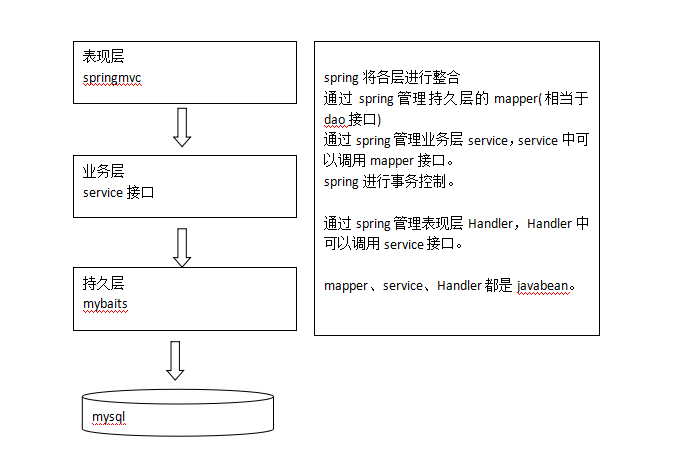
springMVC是表現層,service充當業務層,mybatis作為持久層,通過spring將這三層整合起來。如下圖:
第一步:整合dao層
mybatis和spring整合,通過spring管理mapper接口。使用mapper的掃描器自動掃描mapper接口在spring中進行注冊。
第二步:整合service層
通過spring管理 service接口,使用配置方式將service接口配置在spring配置文件中,實現事務控制。
第三步:整合springmvc
由於springmvc是spring的模塊,不需要整合。
也就是Spring與MyBatis的整合
1、MyBatis的配置:SqlMapConfig.xml
1 <configuration>
2     <typeAliases>
3         <!-- 批量別名定義,掃描整個包下的類,別名為類名(首字母大寫或小寫都可以) -->
4         <package name="com.luchao.pojo" />
5     </typeAliases>
6 </configuration>
2、Dao的配置:applicationContext-dao.xml
配置數據源、SqlSessionFactory、Mapper掃描器
 1 <beans xmlns="http://www.springframework.org/schema/beans"
 2     xmlns:xsi="http://www.w3.org/2001/XMLSchema-instance" xmlns:mvc="http://www.springframework.org/schema/mvc"
 3     xmlns:context="http://www.springframework.org/schema/context"
 4     xmlns:aop="http://www.springframework.org/schema/aop" xmlns:tx="http://www.springframework.org/schema/tx"
 5     xsi:schemaLocation="http://www.springframework.org/schema/beans
 6         http://www.springframework.org/schema/beans/spring-beans-3.2.xsd
 7         http://www.springframework.org/schema/mvc
 8         http://www.springframework.org/schema/mvc/spring-mvc-3.2.xsd
 9         http://www.springframework.org/schema/context
10         http://www.springframework.org/schema/context/spring-context-3.2.xsd
11         http://www.springframework.org/schema/aop
12         http://www.springframework.org/schema/aop/spring-aop-3.2.xsd
13         http://www.springframework.org/schema/tx
14         http://www.springframework.org/schema/tx/spring-tx-3.2.xsd ">
15     <!-- 加載配置文件 -->
16     <context:property-placeholder location="classpath:db.properties" />
17     <!-- 數據源,使用dbcp -->
18     <bean id="dataSource" class="org.apache.commons.dbcp.BasicDataSource"
19         destroy-method="close">
20         <property name="driverClassName" value="${jdbc.driver}" />
21         <property name="url" value="${jdbc.url}" />
22         <property name="username" value="${jdbc.username}" />
23         <property name="password" value="${jdbc.password}" />
24         <property name="maxActive" value="10" />
25         <property name="maxIdle" value="5" />
26     </bean>
27     <!-- sqlSessinFactory -->
28     <bean id="sqlSessionFactory" class="org.mybatis.spring.SqlSessionFactoryBean">
29         <!-- 加載mybatis的配置文件 -->
30         <property name="configLocation" value="classpath:mybatis/SqlMapConfig.xml" />
31         <!-- 數據源 -->
32         <property name="dataSource" ref="dataSource" />
33     </bean>
34     <!-- 配置mapper掃描器 -->
35     <bean class="org.mybatis.spring.mapper.MapperScannerConfigurer">
36         <property name="basePackage" value="com.luchao.mapper"></property>
37         <property name="sqlSessionFactoryBeanName" value="sqlSessionFactory"></property>
38     </bean>
39 </beans>
3、定於Po、Mapper接口和Mapper映射文件。
讓spring管理service
定於service接口:
1 public interface ItemsService {
2     // 獲取商品列表
3     public List<ItemsCustom> findItemsList(ItemsQueryVo itemsQueryVo)
4             throws Exception;
5 }
service實現類:
 1 public class ItemsServiceImpl implements ItemsService {
 2
 3     @Autowired
 4     private ItemsMapperCustom itemsMapperCustom;
 5
 6     @Override
 7     public List<ItemsCustom> findItemsList(ItemsQueryVo itemsQueryVo)
 8             throws Exception {
 9         // 通過itemsMapperCustom查詢數據庫
10         return itemsMapperCustom.findItemsList(itemsQueryVo);
11     }
12 }
在spring容器中中配置service:applicationContext-service.xml
1 <bean id="itemsService" class="com.luchao.service.ItemsServiceImpl"></bean>
事務控制:applicationContext-transaction.xml
 1 <beans xmlns="http://www.springframework.org/schema/beans"
 2     xmlns:xsi="http://www.w3.org/2001/XMLSchema-instance" xmlns:mvc="http://www.springframework.org/schema/mvc"
 3     xmlns:context="http://www.springframework.org/schema/context"
 4     xmlns:aop="http://www.springframework.org/schema/aop" xmlns:tx="http://www.springframework.org/schema/tx"
 5     xsi:schemaLocation="http://www.springframework.org/schema/beans
 6         http://www.springframework.org/schema/beans/spring-beans-3.2.xsd
 7         http://www.springframework.org/schema/mvc
 8         http://www.springframework.org/schema/mvc/spring-mvc-3.2.xsd
 9         http://www.springframework.org/schema/context
10         http://www.springframework.org/schema/context/spring-context-3.2.xsd
11         http://www.springframework.org/schema/aop
12         http://www.springframework.org/schema/aop/spring-aop-3.2.xsd
13         http://www.springframework.org/schema/tx
14         http://www.springframework.org/schema/tx/spring-tx-3.2.xsd ">
15     <!-- 事務管理器 對mybatis操作數據庫事務控制,spring使用jdbc的事務控制類 -->
16     <bean id="transactionManager"
17         class="org.springframework.jdbc.datasource.DataSourceTransactionManager">
18         <!-- 數據源 dataSource在applicationContext-dao.xml中配置了 -->
19         <property name="dataSource" ref="dataSource" />
20     </bean>
21
22     <!-- 通知 -->
23     <tx:advice id="txAdvice" transaction-manager="transactionManager">
24         <tx:attributes>
25             <tx:method name="save*" propagation="REQUIRED"/>
26             <tx:method name="delete*" propagation="REQUIRED"/>
27             <tx:method name="insert*" propagation="REQUIRED"/>
28             <tx:method name="update*" propagation="REQUIRED"/>
29             <tx:method name="find*" propagation="REQUIRED" read-only="true"/>
30             <tx:method name="get*" propagation="REQUIRED" read-only="true"/>
31             <tx:method name="select*" propagation="REQUIRED" read-only="true"/>
32         </tx:attributes>
33     </tx:advice>
34     <!-- aop -->
35     <aop:config>
36         <aop:advisor advice-ref="txAdvice" pointcut="execution(* com.luchao.service.*.*(..))"/>
37     </aop:config>
38 </beans>
通過AOP將事務織入了符合一定條件的方法上面。
配置處理器映射器、適配器、視圖解析器:springmvc.xml
 1 <beans xmlns="http://www.springframework.org/schema/beans"
 2     xmlns:xsi="http://www.w3.org/2001/XMLSchema-instance" xmlns:mvc="http://www.springframework.org/schema/mvc"
 3     xmlns:context="http://www.springframework.org/schema/context"
 4     xmlns:aop="http://www.springframework.org/schema/aop" xmlns:tx="http://www.springframework.org/schema/tx"
 5     xsi:schemaLocation="http://www.springframework.org/schema/beans
 6         http://www.springframework.org/schema/beans/spring-beans-3.2.xsd
 7         http://www.springframework.org/schema/mvc
 8         http://www.springframework.org/schema/mvc/spring-mvc-3.2.xsd
 9         http://www.springframework.org/schema/context
10         http://www.springframework.org/schema/context/spring-context-3.2.xsd
11         http://www.springframework.org/schema/aop
12         http://www.springframework.org/schema/aop/spring-aop-3.2.xsd
13         http://www.springframework.org/schema/tx
14         http://www.springframework.org/schema/tx/spring-tx-3.2.xsd ">
15     <!-- 掃描controller注解,多個包中間使用半角逗號分隔 -->
16     <context:component-scan base-package="com.luchao.controller"/>
17     <mvc:annotation-driven/>
18     <!-- 視圖解析器 -->
19     <bean class="org.springframework.web.servlet.view.InternalResourceViewResolver">
20         <property name="viewClass" value="org.springframework.web.servlet.view.JstlView"/>
21         <property name="prefix" value="/WEB-INF/jsp/"/>
22         <property name="suffix" value=".jsp"/>
23     </bean>
24 </beans>
配置前端控制器:web.xml中加入:
 1 <servlet>
 2         <servlet-name>springmvc</servlet-name>
 3         <servlet-class>org.springframework.web.servlet.DispatcherServlet</servlet-class>
 4         <init-param>
 5             <param-name>contextConfigLocation</param-name>
 6             <param-value>classpath:spring/springmvc.xml</param-value>
 7         </init-param>
 8         <load-on-startup>1</load-on-startup>
 9     </servlet>
10     <servlet-mapping>
11         <servlet-name>springmvc</servlet-name>
12         <url-pattern>/</url-pattern>
13     </servlet-mapping>
編寫控制器:
 1 @Controller
 2 @RequestMapping("/items")
 3 public class ItemController {
 4     @Autowired
 5     private ItemsService itemsService;
 6
 7     // 商品查詢
 8     @RequestMapping("/queryItems")
 9     public ModelAndView queryItems() throws Exception {
10         // 調用service查找 數據庫,查詢商品列表
11         List<ItemsCustom> itemsList = itemsService.findItemsList(null);
12
13         // 返回ModelAndView
14         ModelAndView modelAndView = new ModelAndView();
15         // 相當 於request的setAttribut,在jsp頁面中通過itemsList取數據
16         modelAndView.addObject("itemsList", itemsList);
17
18         // 指定視圖
19         // 下邊的路徑,如果在視圖解析器中配置jsp路徑的前綴和jsp路徑的後綴,修改為
20         // modelAndView.setViewName("/WEB-INF/jsp/items/itemsList.jsp");
21         // 上邊的路徑配置可以不在程序中指定jsp路徑的前綴和jsp路徑的後綴
22         modelAndView.setViewName("items/itemsList");
23
24         return modelAndView;
25     }
26 }
加載spring容器:
將mapper、service、controller加載到spring容器中。在web.xml中,添加spring容器監聽器,加載spring容器。
1 <!-- 加載spring容器 -->
2     <context-param>
3         <param-name>contextConfigLocation</param-name>
4         <param-value>/WEB-INF/classes/spring/applicationContext-*.xml</param-value>
5     </context-param>
6     <listener>
7         <listener-class>org.springframework.web.context.ContextLoaderListener</listener-class>
8     </listener>