本文講述使用JSP實現用戶登錄,包括用戶登錄、注冊和退出功能等。
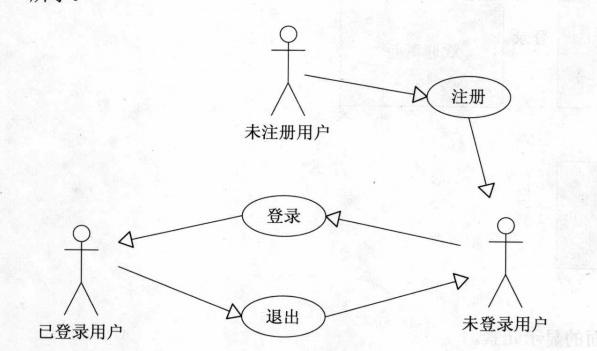
1.系統用例圖
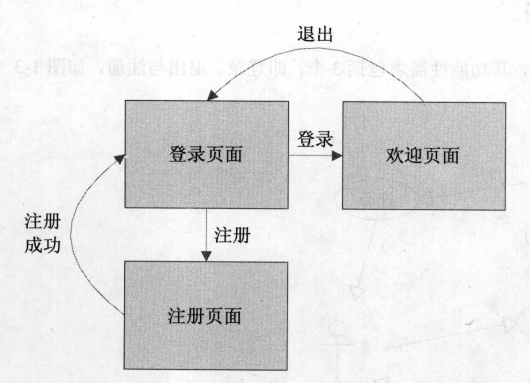
2.頁面流程圖
3.數據庫設計
本例使用oracle數據庫
創建用戶表
包括id,username,password和email,共4個字段
-- Create table
create table P_USER
(
 id  VARCHAR2(50) not null,
 username VARCHAR2(20),
 password VARCHAR2(20),
 email VARCHAR2(50)
)
tablespace USERS
 pctfree 10
 initrans 1
 maxtrans 255
 storage
 (
 initial 64
 minextents 1
 maxextents unlimited
 );
-- Add comments to the table
comment on table P_USER
 is '用戶表';
-- Add comments to the columns
comment on column P_USER.id
 is 'id';
comment on column P_USER.username
 is '用戶名';
comment on column P_USER.password
 is '密碼';
comment on column P_USER.email
 is 'email';
4.頁面設計
4.1登錄頁面
login.jsp
<%@ page language="java" import="java.util.*" pageEncoding="UTF-8"%>
<%
String path = request.getContextPath();
String basePath = request.getScheme()+"://"+request.getServerName()+":"+request.getServerPort()+path+"/";
%>

<!DOCTYPE HTML PUBLIC "-//W3C//DTD HTML 4.01 Transitional//EN">
<html>
 <head>
 <base href="<%=basePath%>">

 <title>登錄頁面</title>

 <meta http-equiv="pragma" content="no-cache">
 <meta http-equiv="cache-control" content="no-cache">
 <meta http-equiv="expires" content="0">
 <meta http-equiv="keywords" content="keyword1,keyword2,keyword3">
 <meta http-equiv="description" content="This is my page">
 <!--
 <link rel="stylesheet" type="text/css" href="styles.css">
 -->
 </head>

 <body>
 <form action="login_action.jsp" method="post">
  <table>
   <tr>
    <td colspan="2">登錄窗口</td>
   </tr>
   <tr>
    <td>用戶名:</td>
    <td><input type="text" name="username" />
    </td>
   </tr>
   <tr>
    <td>密碼:</td>
    <td><input type="text" name="password" />
    </td>
   </tr>
   <tr>
    <td colspan="2"><input type="submit" value="登錄" /> <a href="register.jsp">注冊</a>
    </td>
   </tr>
  </table>
 </form>
</body>
</html>
頁面效果
3.2登錄邏輯處理頁面
login_action.jsp
<%@ page language="java" import="java.util.*" pageEncoding="utf-8"%>
<%@ page import="java.sql.*" %>
<%
String path = request.getContextPath();
String basePath = request.getScheme()+"://"+request.getServerName()+":"+request.getServerPort()+path+"/";
%>

 <%
 String username = request.getParameter("username");
 String password = request.getParameter("password");
 if(username==null||"".equals(username.trim())||password==null||"".equals(password.trim())){
  //out.write("用戶名或密碼不能為空!");
  System.out.println("用戶名或密碼不能為空!");
  response.sendRedirect("login.jsp");
  return;
  //request.getRequestDispatcher("login.jsp").forward(request, response);
 }
 boolean isValid = false;
 Connection con = null;// 創建一個數據庫連接
 PreparedStatement pre = null;// 創建預編譯語句對象,一般都是用這個而不用Statement
 ResultSet result = null;// 創建一個結果集對象
 try
 {
  Class.forName("oracle.jdbc.driver.OracleDriver");// 加載Oracle驅動程序
  //System.out.println("開始嘗試連接數據庫!");
  String url = "jdbc:oracle:" + "thin:@127.0.0.1:1521:orcl";// 127.0.0.1是本機地址,orcl是Oracle的默認數據庫名
  String user = "scott";// 用戶名,系統默認的賬戶名
  String pwd = "tiger";// 你安裝時選設置的密碼
  con = DriverManager.getConnection(url, user, pwd);// 獲取連接
  // System.out.println("連接成功!");
  String sql = "select * from p_user where username=? and password=?";// 預編譯語句,“?”代表參數
  pre = con.prepareStatement(sql);// 實例化預編譯語句
  pre.setString(1, username);// 設置參數,前面的1表示參數的索引,而不是表中列名的索引
  pre.setString(2, password);// 設置參數,前面的1表示參數的索引,而不是表中列名的索引
  result = pre.executeQuery();// 執行查詢,注意括號中不需要再加參數
  if (result.next()){
   isValid = true;
  }
 }
 catch (Exception e)
 {
  e.printStackTrace();
 }
 finally
 {
  try
  {
   // 逐一將上面的幾個對象關閉,因為不關閉的話會影響性能、並且占用資源
   // 注意關閉的順序,最後使用的最先關閉
   if (result != null)
    result.close();
   if (pre != null)
    pre.close();
   if (con != null)
    con.close();
   //System.out.println("數據庫連接已關閉!");
  }
  catch (Exception e)
  {
   e.printStackTrace();
  }
 }
 if(isValid){
  System.out.println("登錄成功!");
  session.setAttribute("username", username);
  response.sendRedirect("welcome.jsp");
  return;
 }else{
  System.out.println("登錄失敗!");
  response.sendRedirect("login.jsp");
  return;
 }
 %>
使用JDBC連接數據庫,如果用戶名或密碼為空時,還是跳轉到登錄頁面login.jsp
如果用戶名和密碼不為空,進行連接數據庫查詢用戶表,如果能夠查詢到記錄,表示登錄成功,將用戶信息保存到session,跳轉到歡迎頁面welcome.jsp
如果根據用戶名和密碼查詢不到記錄,表示登錄失敗,重新跳轉到登錄頁面login.jsp
3.3歡迎頁面
welcome.jsp
<%@ page language="java" import="java.util.*" pageEncoding="UTF-8"%>
<%
String path = request.getContextPath();
String basePath = request.getScheme()+"://"+request.getServerName()+":"+request.getServerPort()+path+"/";
%>

<!DOCTYPE HTML PUBLIC "-//W3C//DTD HTML 4.01 Transitional//EN">
<html>
 <head>
 <base href="<%=basePath%>">

 <title>My JSP 'welcom.jsp' starting page</title>

 <meta http-equiv="pragma" content="no-cache">
 <meta http-equiv="cache-control" content="no-cache">
 <meta http-equiv="expires" content="0">
 <meta http-equiv="keywords" content="keyword1,keyword2,keyword3">
 <meta http-equiv="description" content="This is my page">
 <!--
 <link rel="stylesheet" type="text/css" href="styles.css">
 -->
 </head>

 <body>
 <table>
  <tr>
   <td><img src="images/logo4.png" />
   </td>
   <td><img src="images/logo2.png" height="90" />
   </td>
  </tr>
  <tr>
   <td colspan="2"><hr />
   </td>
  </tr>
  <tr>
   <td>
    <table>
     <tr>
      <td><a>Main</a>
      </td>
     </tr>
     <tr>
      <td><a>Menu1</a>
      </td>
     </tr>
     <tr>
      <td><a>Menu2</a>
      </td>
     </tr>
     <tr>
      <td><a>Menu3</a>
      </td>
     </tr>
     <tr>
      <td><a>Menu4</a>
      </td>
     </tr>
     <tr>
      <td><a>Menu5</a>
      </td>
     </tr>
     <tr>
      <td><a>Menu6</a>
      </td>
     </tr>
     <tr>
      <td><a>Menu7</a>
      </td>
     </tr>
     <tr>
      <td><a>Menu8</a>
      </td>
     </tr>
    </table></td>
   <td>
    <form action="loginout.jsp" method="post">
     <table>
      <tr>
       <td colspan="2">登錄成功!</td>
      </tr>
      <tr>
       <td>歡迎你,</td>
       <td>${username }</td>
      </tr>
      <tr>
       <td colspan="2"><input type="submit" value="退出" /></td>
      </tr>
     </table>
    </form></td>
  </tr>
 </table>
</body>
</html>
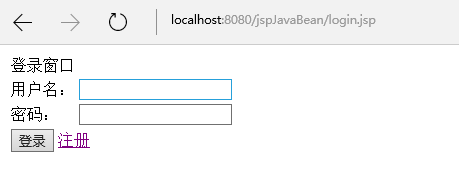
使用EL表達式展示用戶信息
效果
3.4歡迎頁退出邏輯處理頁面
loginout.jsp
<%@ page language="java" import="java.util.*" pageEncoding="UTF-8"%>
<%
String path = request.getContextPath();
String basePath = request.getScheme()+"://"+request.getServerName()+":"+request.getServerPort()+path+"/";
%>

<!DOCTYPE HTML PUBLIC "-//W3C//DTD HTML 4.01 Transitional//EN">
<html>
 <head>
 <base href="<%=basePath%>">

 <title>My JSP 'loginout.jsp' starting page</title>

 <meta http-equiv="pragma" content="no-cache">
 <meta http-equiv="cache-control" content="no-cache">
 <meta http-equiv="expires" content="0">
 <meta http-equiv="keywords" content="keyword1,keyword2,keyword3">
 <meta http-equiv="description" content="This is my page">
 <!--
 <link rel="stylesheet" type="text/css" href="styles.css">
 -->

 </head>

 <body>
 <%
 session.removeAttribute("username");
 response.sendRedirect("login.jsp");
 %>
 </body>
</html>
將session的用戶信息移除,跳轉到登錄頁面login.jsp
3.5注冊頁面
register.jsp
<%@ page language="java" import="java.util.*" pageEncoding="UTF-8"%>
<%
String path = request.getContextPath();
String basePath = request.getScheme()+"://"+request.getServerName()+":"+request.getServerPort()+path+"/";
%>

<!DOCTYPE HTML PUBLIC "-//W3C//DTD HTML 4.01 Transitional//EN">
<html>
 <head>
 <base href="<%=basePath%>">

 <title>注冊頁面</title>

 <meta http-equiv="pragma" content="no-cache">
 <meta http-equiv="cache-control" content="no-cache">
 <meta http-equiv="expires" content="0">
 <meta http-equiv="keywords" content="keyword1,keyword2,keyword3">
 <meta http-equiv="description" content="This is my page">
 <!--
 <link rel="stylesheet" type="text/css" href="styles.css">
 -->
 </head>

 <body>
 <form action="register_action.jsp" method="post">
  <table>
   <tr>
    <td colspan="2">注冊窗口</td>
   </tr>
   <tr>
    <td>用戶名:</td>
    <td><input type="text" name="username" /></td>
   </tr>
   <tr>
    <td>密碼:</td>
    <td><input type="text" name="password1" /></td>
   </tr>
   <tr>
    <td>確認密碼:</td>
    <td><input type="text" name="password2" /></td>
   </tr>
   <tr>
    <td>email:</td>
    <td><input type="text" name="email" /></td>
   </tr>
   <tr>
    <td colspan="2"><input type="submit" value="注冊" /> <a href="login.jsp">返回</a></td>
   </tr>
  </table>
 </form>
</body>
</html>
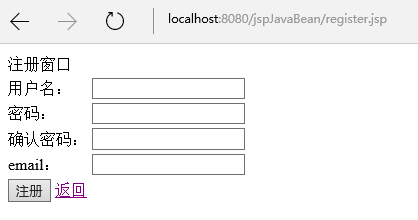
當在登錄頁面點擊“注冊“時打開用戶注冊頁面
效果
3.6注冊邏輯處理頁面
register_action.jsp
<%@ page language="java" import="java.util.*" pageEncoding="UTF-8"%>
<%@ page import="java.sql.*" %>
<%
String path = request.getContextPath();
String basePath = request.getScheme()+"://"+request.getServerName()+":"+request.getServerPort()+path+"/";
%>
 <%
 String username = request.getParameter("username");
 String password1 = request.getParameter("password1");
 String password2 = request.getParameter("password2");
 String email = request.getParameter("email");
 if(username==null||"".equals(username.trim())||password1==null||"".equals(password1.trim())||password2==null||"".equals(password2.trim())||!password1.equals(password2)){
  //out.write("用戶名或密碼不能為空!");
  System.out.println("用戶名或密碼不能為空!");
  response.sendRedirect("register.jsp");
  return;
  //request.getRequestDispatcher("login.jsp").forward(request, response);
 }
 boolean isValid = false;
 Connection con = null;// 創建一個數據庫連接
 PreparedStatement pre = null;// 創建預編譯語句對象,一般都是用這個而不用Statement
 ResultSet result = null;// 創建一個結果集對象
 try
 {
  Class.forName("oracle.jdbc.driver.OracleDriver");// 加載Oracle驅動程序
  //System.out.println("開始嘗試連接數據庫!");
  String url = "jdbc:oracle:" + "thin:@127.0.0.1:1521:orcl";// 127.0.0.1是本機地址,orcl是Oracle的默認數據庫名
  String user = "scott";// 用戶名,系統默認的賬戶名
  String pwd = "tiger";// 你安裝時選設置的密碼
  con = DriverManager.getConnection(url, user, pwd);// 獲取連接
  //System.out.println("連接成功!");
  String sql = "select * from p_user where username=?";// 預編譯語句,“?”代表參數
  pre = con.prepareStatement(sql);// 實例化預編譯語句
  pre.setString(1, username);// 設置參數,前面的1表示參數的索引,而不是表中列名的索引
  result = pre.executeQuery();// 執行查詢,注意括號中不需要再加參數
  if (!result.next()){
   sql = "insert into p_user(id,username,password,email) values(?,?,?,?)";// 預編譯語句,“?”代表參數
   pre = con.prepareStatement(sql);// 實例化預編譯語句
   pre.setString(1, System.currentTimeMillis()+"");// 設置參數,前面的1表示參數的索引,而不是表中列名的索引
   pre.setString(2, username);// 設置參數,前面的1表示參數的索引,而不是表中列名的索引
   pre.setString(3, password1);// 設置參數,前面的1表示參數的索引,而不是表中列名的索引
   pre.setString(4, email);// 設置參數,前面的1表示參數的索引,而不是表中列名的索引
   pre.executeUpdate();// 執行
   isValid = true;
  }
 }
 catch (Exception e)
 {
  e.printStackTrace();
 }
 finally
 {
  try
  {
   // 逐一將上面的幾個對象關閉,因為不關閉的話會影響性能、並且占用資源
   // 注意關閉的順序,最後使用的最先關閉
   if (result != null)
    result.close();
   if (pre != null)
    pre.close();
   if (con != null)
    con.close();
   //System.out.println("數據庫連接已關閉!");
  }
  catch (Exception e)
  {
   e.printStackTrace();
  }
 }
 if(isValid){
  System.out.println("注冊成功,請登錄!");
  response.sendRedirect("login.jsp");
  return;
 }else{
  System.out.println("用戶名已存在!");
  response.sendRedirect("register.jsp");
  return;
 }
 %>
首先判斷用戶名和密碼是否為空,以及密碼和確認密碼是否一致,如果上述條件不成立時,返回到注冊頁面register.jsp
如果上述條件成立,就根據用戶名到數據庫查詢,如果能夠查詢到記錄,說明用戶名已經存在,返回到注冊頁面register.jsp
如果查詢不到記錄,說明此用戶名可用來進行注冊,使用JDBC向用戶表 插入1條記錄;之後跳轉到登錄頁面login.jsp
4.總結
本例使用JSP實現用戶登錄,編寫過程中,主要遇到了2個小問題。
4.1查詢之後,判斷記錄是否存在,需要使用 if (!result.next()),而不是通常查詢中使用的while循環,這一點需要注意,特別是在處理注冊時。
4.2關於JSP頁面的編譯報錯問題。
當在JSP小腳本中中使用return時要慎重,很可能會出現編譯錯誤。
處理方法是,JSP主頁面只使用JSP小腳本,保證return之後沒有還需要編譯的內容即可。
以上即為使用JSP實現用戶登錄的簡單介紹,希望對大家的學習有所幫助。