簡單的基於xml做數據庫的登錄與注冊
主題介紹:
1.xml的讀取和存儲,主要是用到dom4j技術,(網絡中的文件存儲路徑采用classLoader)
文件的讀取和存儲,寫了一個工廠類
public class DocumentFactory {
 private static Document dom=null;//需要共享一個dom,所以需要設置為static
 private static String name="user.xml";
 private static String filename;


//寫一個靜態塊實現對dom樹的讀取
static{//dom4j技術
 SAXReader read=new SAXReader();
  filename=DocumentFactory.class.getClassLoader().getResource(name).getPath();//采用類加載器進行讀取文件
    try {
    dom=read.read(filename);
   } catch (DocumentException e) {<span >   e.printStackTrace();}}</span>

//主要獲得和存儲的兩個函數(采用單例模式)(必須共享一個dom數)

public static Document getDocument(){ //獲得xml中的dom樹
 return dom;
}

//注冊之後需要保存
 public static void Save() {
  XMLWriter wr;
  try {
   wr = new XMLWriter(new FileOutputStream(filename));
  }catch (Exception e1) {
   throw new RuntimeException("存儲文件時讀文件失敗");
  }
  try {
   wr.write(dom);
  } catch (IOException e) {
   throw new RuntimeException("寫文件失敗"+e.getMessage());
  }finally{
   try {
    if(wr!=null){
    wr.close();
    }
   } catch (IOException e) {
    throw new RuntimeException("關流失敗"+e.getMessage());}}}
}
2.前台的技術:基本上就是界面的搭建和將數據傳到後台進行處理。以及部分的必填選項要求。
兩個頁面的代碼:
//登錄
<body>
   <form action='login' method="post">
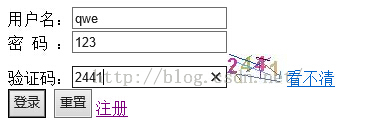
   用戶名:<input type="text" name="name" /><br/>
   密 碼 :<input type="text" name="pwd" /><br/>
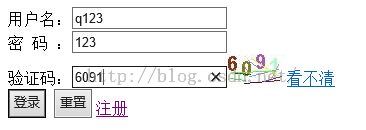
   驗證碼:<input type="text" name="checkCode"><img src="/LOGIN/immg" id='imgid'><a href="javascript:flush()">看不清</a>//需要重寫一個js進行刷新
   <br/>
   <input type="submit"value="登錄" />
   <input type="reset"value="重置" />
   <a href='jsps/Reg.jsp'>注冊</a>

  </form>
//登錄後台的處理
public class Login extends HttpServlet {

 public void doGet(HttpServletRequest request, HttpServletResponse response)
   throws ServletException, IOException {
  doPost(request, response);
 }


 public void doPost(HttpServletRequest request, HttpServletResponse response)
   throws ServletException, IOException {

  request.setCharacterEncoding("utf-8");//設置utf-8的編碼格式去接收
  response.setContentType("text/html;charset=UTF-8");//<span >設置頁面顯示方式,這個設置必須要在獲得輸出流之前設置,不然設置都沒有用,照樣會出現亂碼</span>
  PrintWriter out = response.getWriter();

  out.println("<!DOCTYPE HTML PUBLIC \"-//W3C//DTD HTML 4.01 Transitional//EN\">");
  out.println("<HTML>");
  out.println(" <HEAD><TITLE>A Servlet</TITLE>");
  out.println(" <meta http-equiv='content-type' content='text/html; charset=UTF-8'> </HEAD>");
  out.println(" <BODY>");
  String name=request.getParameter("name");
  String pwd=request.getParameter("pwd");
  String check=request.getParameter("checkCode");//從界面獲得驗證碼輸入的值
  ImgDemo id =new ImgDemo();
  String str=id.getStr();
  if(!check.equals(str)){
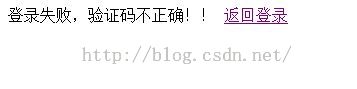
   out.println("登錄失敗,驗證碼不正確!!");//要是驗證碼不符合,直接返回登錄界面
   out.print("<a href='index.jsp'>返回登錄</a>");
   return;
  }
//  System.out.println("11"+check);
//  System.out.println("22"+str);

  //登錄前獲得所有的對象
  Document dom=DocumentFactory.getDocument();
  boolean flag=false;
  Element root=dom.getRootElement();
  Iterator<Element> it=root.elementIterator();

  while(it.hasNext()){
   Element ele =it.next();
   String nameC=ele.attributeValue("name");
   String pwdC=ele.attributeValue("pwd");
   if(name.trim().equals(nameC)&&pwdC.equals(pwdC)){
    flag=true;
    break;
   }
  }
  if(flag){
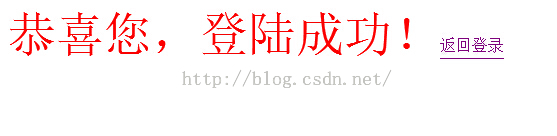
   out.print("<font color='red' size='8px'>恭喜您,登陸成功!</font>");
   out.println("<a href='index.jsp'>返回登錄</a>");
  }else{
   out.print("用戶名和密碼不匹配。登錄失敗。。。");
   out.println("<a href='index.jsp'>返回登錄</a>");
  }
  out.println(" </BODY>");
  out.println("</HTML>");
  out.flush();
  out.close();
 }

}
//注冊
<body>
  <form action='reg' method="post">
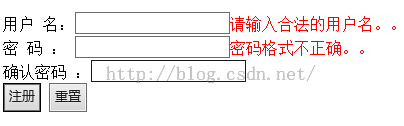
   用戶 名:<input type="text" name="name" onblur="check()" id="name"/><span id="spanid"></span><br/>
   密 碼 : <input type="text" name="pwd" id="pwd" onblur="check1()"/><span id="spanid1"></span><br/>
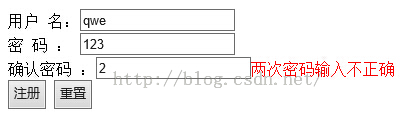
   確認密碼 :<input type="text" name="pwd2" id="pwd2" onblur="check2()"/><span id="spanid2"></span><br/>
   <input type="submit"value="注冊" />
   <input type="reset"value="重置" />

  </form>
 </body>
//注冊的後台處理
public void doPost(HttpServletRequest request, HttpServletResponse response)
   throws ServletException, IOException {

  response.setContentType("text/html;charset=utf-8");//<span >必須要設置在獲得Printwrite之前,都則設置無效</span>
  PrintWriter out = response.getWriter();
  out.println("<!DOCTYPE HTML PUBLIC \"-//W3C//DTD HTML 4.01 Transitional//EN\">");
  out.println("<HTML>");
  out.println(" <HEAD><TITLE>A Servlet</TITLE></HEAD>");
  out.println(" <BODY>");
  boolean flag=false;

  request.setCharacterEncoding("utf-8");
  String name=request.getParameter("name");
  String pwd=request.getParameter("pwd");


  Document dom =DocumentFactory.getDocument();
  Element root=dom.getRootElement();
  Iterator<Element> it=root.elementIterator();
  while(it.hasNext()){
   Element ele=it.next();
   String nameR=ele.attributeValue("name");//這裡傳過來的值可能是null.所以我們必須在前台要預防一下,當然在這裡也要考慮一下
   String pwdR=ele.attributeValue("pwd");
   if(name.equals(nameR)&&pwd.equals(pwdR)){
    flag=true;
    break;
   }
  }
  if(flag){
   out.print("此用戶已注冊!!");
   out.print("<a href='jsps/Reg.jsp'>返回注冊</a>");
  }else{
   Element ele=root.addElement("user");
   ele.addAttribute("name", name);
   ele.addAttribute("pwd", pwd);
   DocumentFactory.Save();
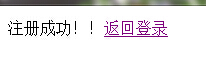
   out.print("注冊成功!!");
   out.print("<a href='index.jsp'>返回登錄</a>");
  }
  out.println(" </BODY>");
  out.println("</HTML>");
}
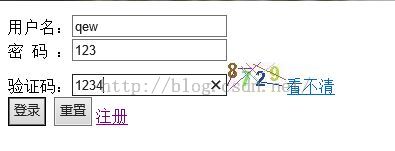
3.驗證碼技術:同樣的從後台獲取圖片,以及登錄時候進行匹配
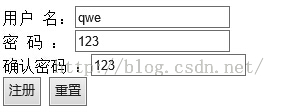
效果圖:
1,首先是驗證驗證碼的
2.密碼匹配

3,用戶注冊
4.密碼正確
5,查看user.xml文件

整個登錄和注冊的源代碼下載地址:jsp基於XML實現用戶登錄與注冊的實例解析
以上就是本文的全部內容,希望對大家的學習有所幫助。