本文實例講述了Yii安裝與使用Excel擴展的方法。分享給大家供大家參考,具體如下:
1.下載EExcelBehavior到項目擴展目錄下
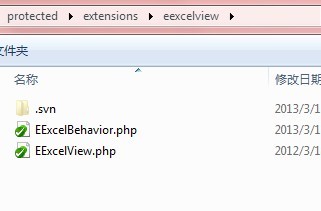
2.下載phpexcl到擴展目錄
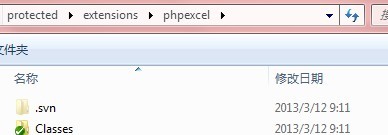
3.控制器調用:
/**
 * 導出列表,各商家保障金列表
 */
public function actionExport(){
  $model = $model=new Company('search');
  $model->unsetAttributes(); // clear any default values
  $model->zc_deposit_status = 2;//保障金審核通過的商家
  $companys = $model->search();
  $this->toExcel($companys,array('zc_name','zc_deposit'));
}
/**
 * 導出列表,商家保障金變動明細
 */
public function actionExportDeposit($id){
  $model=new CmpDeposit('search');
  $model->unsetAttributes(); // clear any default values
  $model->zm_id = $id;
  $data = $model->search();
  $company = Company::model()->findByPk($id);
  $this->toExcel($data,'',$company->zc_name.'網鋪保障金明細');
}
public function behaviors()
{
  return array(
      'eexcelview'=>array(
          'class'=>'ext.eexcelview.EExcelBehavior',
      ),
  );
}
4.具體用法:
 * @param null string|CDataProvider|array $model the data provider for the grid.
 * @param null array $columns array with specif columns and its format. Defaults to all attributes.
 * @param null string $title title for the file
 * @param null array $documentDetails details of the document
 * @param null string $exportType format to export (Excel5,Excel2007, PDF, HTML, CSV). Defaults to Excel2007 (xlsx)
 */
public function toExcel($model=null, $columns=array(), $title=null, $documentDetails=array(), $exportType='Excel2007')
更多關於Yii相關內容感興趣的讀者可查看本站專題:《Yii框架入門及常用技巧總結》、《php優秀開發框架總結》、《smarty模板入門基礎教程》、《php操作office文檔技巧總結(包括word,excel,access,ppt)》、《php面向對象程序設計入門教程》、《php字符串(string)用法總結》、《php+mysql數據庫操作入門教程》及《php常見數據庫操作技巧匯總》
希望本文所述對大家基於Yii框架的PHP程序設計有所幫助。