一、制作思路
由於注冊的時候常常會用到注冊碼來防止機器惡意注冊,這裡我發表一個產生png圖片驗證碼的基本圖像,簡單的思路分析:
1、產生一張png的圖片
2、為圖片設置背景色
3、設置字體顏色和樣式
4、產生4位數的隨機的驗證碼
5、把產生的每個字符調整旋轉角度和位置畫到png圖片上
6、加入噪點和干擾線防止注冊機器分析原圖片來惡意注冊
7、輸出圖片
8、釋放圖片所占內存
二、實現方法
authcode.php文件
<?php
    session_start ();
    header ( 'Content-type: image/png' );
    //創建圖片
    $im = imagecreate($x=130,$y=45 );
    $bg = imagecolorallocate($im,rand(50,200),rand(0,155),rand(0,155)); //第一次對 imagecolorallocate() 的調用會給基於調色板的圖像填充背景色
    $fontColor = imageColorAllocate ( $im, 255, 255, 255 );  //字體顏色
    $fontstyle = 'rock.ttf';          //字體樣式,這個可以從c:\windows\Fonts\文件夾下找到,我把它放到和authcode.php文件同一個目錄,這裡可以替換其他的字體樣式
    //產生隨機字符
    for($i = 0; $i < 4; $i ++) {
        $randAsciiNumArray     = array (rand(48,57),rand(65,90));
        $randAsciiNum         = $randAsciiNumArray [rand ( 0, 1 )];
        $randStr             = chr ( $randAsciiNum );
        imagettftext($im,30,rand(0,20)-rand(0,25),5+$i*30,rand(30,35),$fontColor,$fontstyle,$randStr);
        $authcode            .= $randStr;
    }
    $_SESSION['authcode']    = $randFourStr;//用戶和用戶輸入的驗證碼做比較
    //干擾線
    for ($i=0;$i<8;$i++){
        $lineColor    = imagecolorallocate($im,rand(0,255),rand(0,255),rand(0,255));
        imageline ($im,rand(0,$x),0,rand(0,$x),$y,$lineColor);
    }
    //干擾點
    for ($i=0;$i<250;$i++){
        imagesetpixel($im,rand(0,$x),rand(0,$y),$fontColor);
    }
    imagepng($im);
    imagedestroy($im);
?>
效果圖:
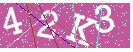
以上就是php驗證碼的制作思路和實現方法,希望對大家的學習有所幫助。