越來越離不開Sublime Text(下稱ST) This lightweight cross-platform editor is now available, Meets all my requirements for lightweight editing code, 並不像VSCodesame bloated, The memory usage is not large, But one thing that is not good is that many plugins in the plugin market are now unmaintained, As a result, most developers are now turning to itvscode陣營了(I don't want to do most of it).
I can't get enough of this awesome editor, 不管是刷LeetCodeOr write a small test program, Made me feel very comfortable. But recently encountered a problem, 就是在ST中寫C++Sometimes code formatting doesn't always work, At first I used a model called CoolFormat的插件, 但是遇到C++Code always promptsCannot format this file, The recommended plugin found online isSublimeAStyleFormatter1, It is said to be used for formattingC-likeCode is better, 並且內置了astyle引擎, The formatting style of the code segment can be customized, For details, please see the official website2.
如果你用的是arm Mac的話, Here you have to configure it after installation, Because this plugin has not been updated for a long time, 對於armMacsupport is not yet available, 不過看到了issue3中的解決方案, 我成功實現了C++代碼的ST代碼格式化方法.
順帶提一下Python和JSON的格式化, 都有對應的插件, 比較方便.
Sublime Text 4: Build 4126
MacOS 12.3.1 (arm64)
直接調出packageControl(command+shift+P), 輸入insp進入Package Install, Enter the package name to install.
After that is the configurationarm Mac中成功運行Astyle:
* cd ~/Library/Application\ Support/Sublime\ Text\ 3/Packages/SublimeAStyleFormatter/pyastyle/python3/
* mkdir _darwin
* cd _darwin
* touch __init__.py
* pip install pyastyle# 這裡我用到的Python是Mac中自帶的
Defaulting to user installation because normal site-packages is not writeable
Looking in indexes: https://pypi.tuna.tsinghua.edu.cn/simple
Requirement already satisfied: pyastyle in /Users/xxx/Library/Python/3.8/lib/python/site-packages (1.1.5)
* which pip
/Users/xxx/Library/Python/3.8/bin//pip
* cp /Users/xxx/Library/Python/3.8/lib/python/site-packages/pyastyle.cpython-38-darwin.so pyastyle.so
* cd ..
* ls
__init__.py _linux_x86 _local_arch _win32
_darwin _linux_x86_64 _macosx_universal _win64
* subl __init__.py # 編輯這個文件, Comment out everything, 加入內容, 修改後如下
# try:
# from ._local_arch.pyastyle import *
# platform = "Local arch"
# except ImportError:
# try:
# from ._linux_x86_64.pyastyle import *
# platform = "Linux 64 bits"
# except ImportError:
# try:
# from ._linux_x86.pyastyle import *
# platform = "Linux 32 bits"
# except ImportError:
# try:
# from ._win64.pyastyle import *
# platform = "Windows 64 bits"
# except ImportError:
# try:
# from ._win32.pyastyle import *
# platform = "Windows 32 bits"
# except ImportError:
# try:
# from ._macosx_universal.pyastyle import *
# platform = "MacOS X Universal"
# except ImportError:
# raise ImportError(
# "Could not find a suitable pyastyle binary for your platform and architecture.")
try:
from ._darwin.pyastyle import *
platform = "MacOS X Darwin"
except ImportError:
raise ImportError(
"Could not find a suitable pyastyle binary for your platform and architecture.")
然後重啟ST, 打開一個C++文件,可以看到AstyleFormatter的FormatIt's already clickable.
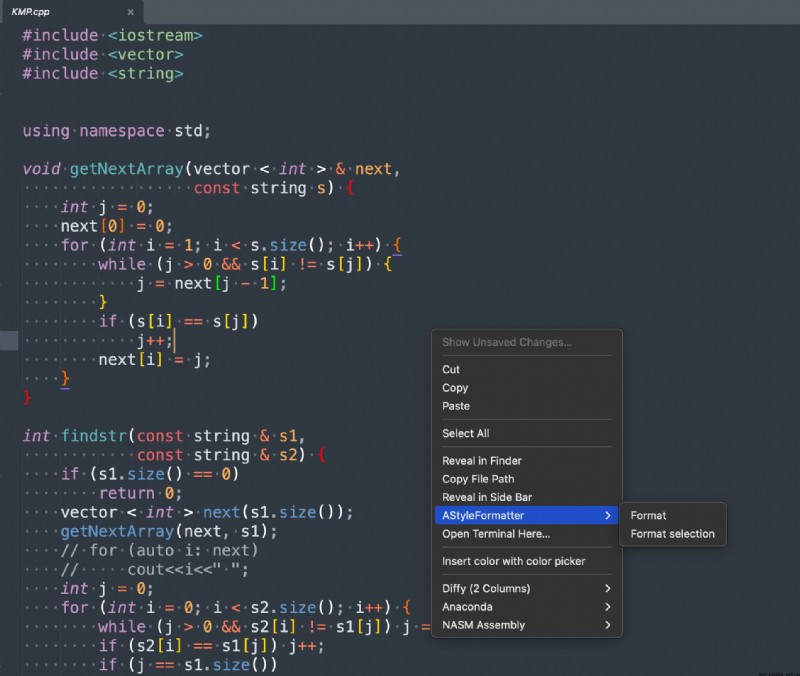
Here I set three shortcut keys, 如下:
其中pythonFormatting and JSONThe formatting is passed separatelyAnaconda和jsFormatThese two plugins are done.
{

"keys": ["super+alt+/"], //format C/C++
"command": "astyleformat",
"context": [{

"key": "astyleformat_is_enabled",
"operator": "equal",
"operand": ""
}]
}, {

"keys": ["super+k", "super+f"],
"command": "astyleformat",
"args": {

"selection_only": true
},
"context": [{

"key": "astyleformat_is_enabled",
"operator": "equal",
"operand": ""
}]
}, {

"keys": [
"command+i"
],
"command": "reindent"
}, {

"keys": [
"ctrl+shift+s"
],
"command": "auto_save"
}, {

"keys": [
"super+alt+j" // format json
],
"command": "js_format"
}, {

"command": "anaconda_auto_format",
"keys": ["super+alt+l"], //format python
"context": [{

"key": "selector",
"operator": "equal",
"operand": "source.python"
}]
},
SublimeAStyleFormatter - Packages - Package Control; ︎
Artistic Style (sourceforge.net); ︎
Formatting Not Working - M1 Macs (darwin/arm64) Unsupported · Issue #95 · timonwong/SublimeAStyleFormatter (github.com); ︎
 [C # -python communication] C # transmits images to Python server through UDP communication for target detection (using pre training yolov4 model)
Screenshot Demo screen Pre t