pip install pyautogui Official website :
pyautogui http://pyautogui.readthedocs.io/en/latest/
PyAutoGUI Can simulate moving the mouse , Click the mouse , Drag with mouse , Key , Press and hold the key , You can also press the keyboard hotkey combination .
mouse :
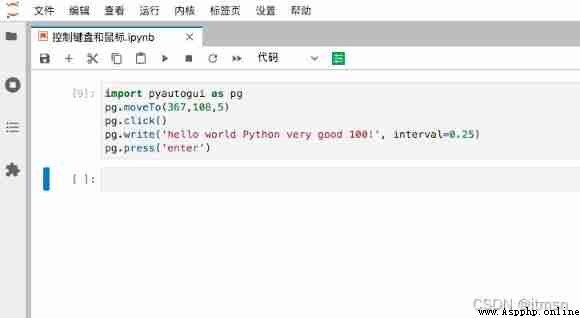
single click :pyautogui.click()
Right click :pyautogui.click(button='right')
double-click :pyautogui.doubleClick()
Move the mouse :pg.moveTo(100,200,2)
Drag and drop the mouse :pg.dragTo(300, 400, 2, button='left')
keyboard :
enter :pyautogui.press('enter')
Press the left key :pyautogui.press('left')
Press down CTRL:pyautogui.press('ctrl')
 Shortcut keys can be used hotkey Method , Press down Ctrl + Shift + T
 pyautogui.hotkey('ctrl', 'shift', 't')
pyautogui.hotkey('ctrl', 'c')
>>> import pyautogui
# Get screen size
>>> screenWidth, screenHeight = pyautogui.size()
# Get the current coordinate position
>>> currentMouseX, currentMouseY = pyautogui.position()
# Move the mouse to the coordinate of 100,150 The location of
>>> pyautogui.moveTo(100, 150)
# Left click
>>> pyautogui.click()
# Mouse movement 10 Pixel
>>> pyautogui.moveRel(None, 10) # move mouse 10 pixels down
# Mouse click
>>> pyautogui.doubleClick()
>>> pyautogui.moveTo(500, 500, duration=2, tween=pyautogui.easeInOutQuad) # use tweening/easing function to move mouse over 2 seconds.
# Keyboard entry Hello world! The interval is 0.25 second
>>> pyautogui.typewrite('Hello world!', interval=0.25) # type with quarter-second pause in between each key
# Key esc
>>> pyautogui.press('esc')
# shift Press down
>>> pyautogui.keyDown('shift')
# Key left direction key
>>> pyautogui.press(['left', 'left', 'left', 'left', 'left', 'left'])
# shift Spring up
>>> pyautogui.keyUp('shift')
# Assembly ctrl +c
>>> pyautogui.hotkey('ctrl', 'c')PyAutoGUI The function increases the delay to 2.5 second :
import pyautogui
pyautogui.PAUSE = 2.5
The mouse operation :
Move
import pyautogui
width, hight = pyautogui.size()
pyautogui.moveTo(width/2, hight/2) # Basic mobility
pyautogui.moveTo(200, 200, duration=2) # The movement process continues 2s complete
pyautogui.moveTo(None, 100) # X Direction unchanged ,Y Move in the direction of 100
pyautogui.moveRel(-40, 500) # Move relative position
PyAutoGUI Keyboard table :
‘enter’ ( or ‘return’ or ‘\n’)
enter
‘esc’
ESC key
‘shiftleft’, ‘shiftright’
about SHIFT key
‘altleft’, ‘altright’
about ALT key
‘ctrlleft’, ‘ctrlright’
about CTRL key
‘tab’ (‘\t’)
TAB key
‘backspace’, ‘delete’
BACKSPACE 、DELETE key
‘pageup’, ‘pagedown’
PAGE UP and PAGE DOWN key
‘home’, ‘end’
HOME and END key
‘up’, ‘down’, ‘left’, ‘right’
Arrow keys
‘f1’, ‘f2’, ‘f3’….
F1…….F12 key
‘volumemute’, ‘volumedown’, ‘volumeup’
Some keyboards don't have
‘pause’
PAUSE key
‘capslock’, ‘numlock’, ‘scrolllock’
CAPS LOCK, NUM LOCK, and SCROLL LOCK key
‘insert’
INS or INSERT key
‘printscreen’
PRTSC or PRINT SCREEN key
‘winleft’, ‘winright’
Win key
‘command’
Mac OS X command key
 Latest research: the history of pandas eating bamboo may be traced back to 6million years ago
Giant pandas belonging to carn
 Python remote monitoring script: use paramiko and psutil to monitor the CPU, memory, disk and network usage of the remote machine
subject Use python Write a sc
 Python analyzes 90000 pieces of data to tell you who is the absolute C in the Avengers alliance!
author | Luo Zhao Cheng Coord