# -*- coding: utf-8 -*-
import cv2
file=r'D:/Setting.png' #大圖
temp=r'D:/Battery.png' #小圖
# 彈出圖片後 CTRL+S保存圖片到本地
method = cv2.TM_SQDIFF_NORMED
# method = cv2.TM_CCOEFF_NORMED
# Read the images from the file
small_image = cv2.imread(temp)
large_image = cv2.imread(file)
result = cv2.matchTemplate(small_image, large_image, method)
# 需要最小平方差
mn,_,mnLoc,_ = cv2.minMaxLoc(result)
# 開始畫矩形:
# Extract the coordinates of our best match
MPx,MPy = mnLoc #獲得最小坐標的
print(MPx, MPy)
# MPx1,MPy1 = mxLoc #獲得最大坐標的
# print(MPx1, MPy1)
# Step 2: Get the size of the template. This is the same size as the match.
trows,tcols = small_image.shape[:2] #獲得圖片的寬度
# Step 3: Draw the rectangle on large_image
# 將小圖片用紅線在大圖片圈出來
cv2.rectangle(large_image, (MPx,MPy),(MPx+tcols,MPy+trows),(0,0,255),2)
# cv2.rectangle(large_image, (MPx+169,MPy+76),(MPx+719,MPy+117),(0,0,255),2)
# Display the original image with the rectangle around the match.
cv2.imshow('output',large_image)
# The image is only displayed if we call this
cv2.waitKey(0)
#方法不同,獲得的坐標不同
# print(MPx, MPy)
# print(MPx1, MPy1)
# 注意看一下兩種方法有一個結果是相同的
#cv2.TM_SQDIFF_NORMED
# 結果:
# 96 179
# 70 1122
# cv2.TM_CCOEFF_NORMED
# 結果:
# 72 1631
# 96 179
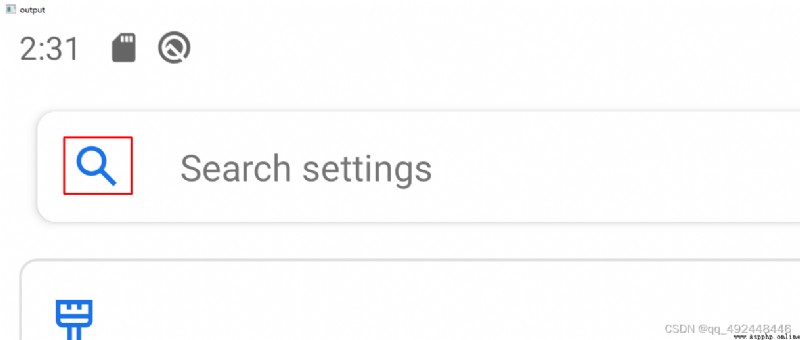
如下圖所示,在背景圖片中找到的 搜索的 圖標,並用紅線圈出來