1、 tetris 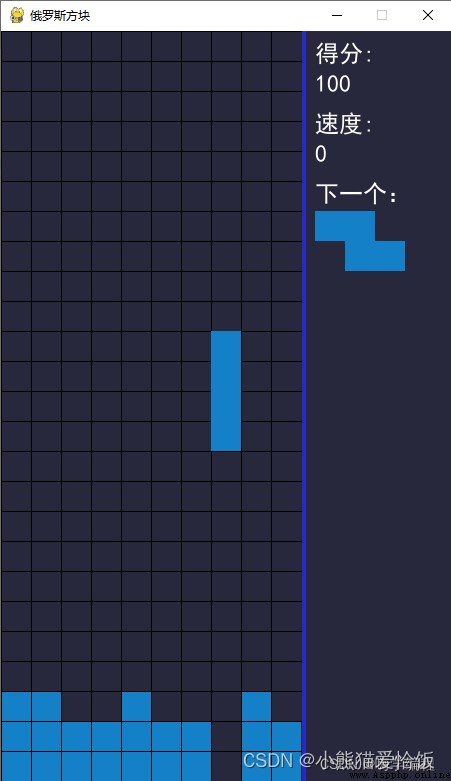
2、 Mine clearance 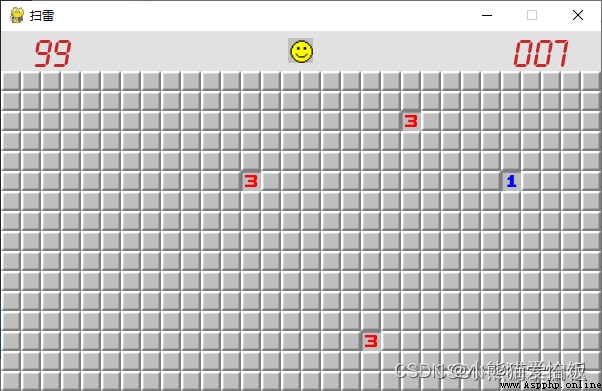
3、 gobang 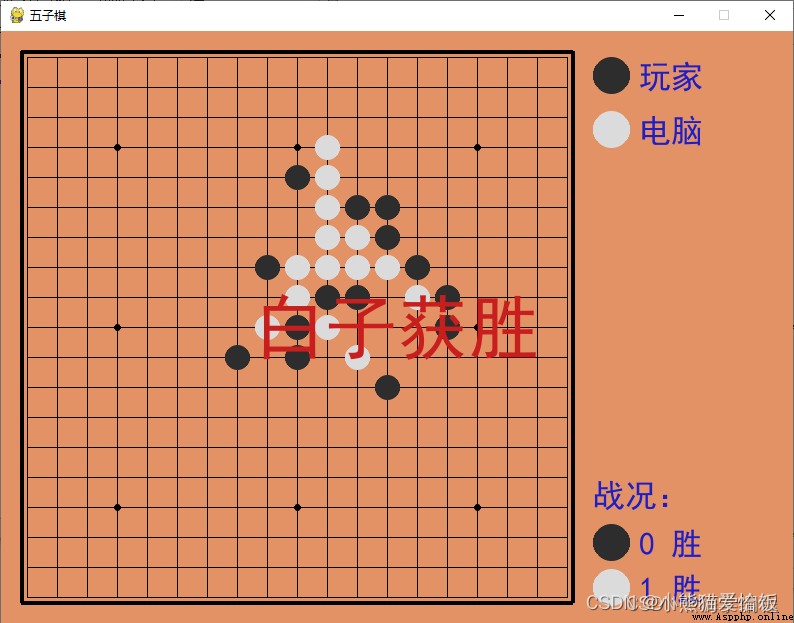
4、 snake 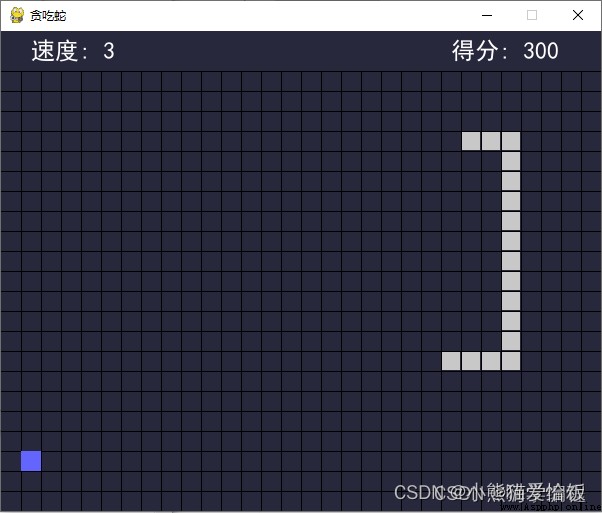
harm , This is the most thrilling , For my little heart , Don't play, don't play …
1、 tetris
Block part
This part of the code is saved separately py file , Here I'll name it blocks.py
Design of square shape , At first I made 4 × 4, Length and width are the longest 4 If you rotate, you don't consider how to rotate , Is to replace one figure with another .
To implement this function , Just fix the coordinates of the upper left corner .
python Answering question consulting Learning exchange group 2:660193417###
import random
from collections import namedtuple
Point = namedtuple('Point', 'X Y')
Shape = namedtuple('Shape', 'X Y Width Height')
Block = namedtuple('Block', 'template start_pos end_pos name next')
# S Shape of square
S_BLOCK = [Block(['.OO',
'OO.',
'...'], Point(0, 0), Point(2, 1), 'S', 1),
Block(['O..',
'OO.',
'.O.'], Point(0, 0), Point(1, 2), 'S', 0)]
# Z Shape of square
Z_BLOCK = [Block(['OO.',
'.OO',
'...'], Point(0, 0), Point(2, 1), 'Z', 1),
Block(['.O.',
'OO.',
'O..'], Point(0, 0), Point(1, 2), 'Z', 0)]
# I Shape block
I_BLOCK = [Block(['.O..',
'.O..',
'.O..',
'.O..'], Point(1, 0), Point(1, 3), 'I', 1),
Block(['....',
'....',
'OOOO',
'....'], Point(0, 2), Point(3, 2), 'I', 0)]
# O Shape block
O_BLOCK = [Block(['OO',
'OO'], Point(0, 0), Point(1, 1), 'O', 0)]
# J Shape block
J_BLOCK = [Block(['O..',
'OOO',
'...'], Point(0, 0), Point(2, 1), 'J', 1),
Block(['.OO',
'.O.',
'.O.'], Point(1, 0), Point(2, 2), 'J', 2),
Block(['...',
'OOO',
'..O'], Point(0, 1), Point(2, 2), 'J', 3),
Block(['.O.',
'.O.',
'OO.'], Point(0, 0), Point(1, 2), 'J', 0)]
# L Shape block
L_BLOCK = [Block(['..O',
'OOO',
'...'], Point(0, 0), Point(2, 1), 'L', 1),
Block(['.O.',
'.O.',
'.OO'], Point(1, 0), Point(2, 2), 'L', 2),
Block(['...',
'OOO',
'O..'], Point(0, 1), Point(2, 2), 'L', 3),
Block(['OO.',
'.O.',
'.O.'], Point(0, 0), Point(1, 2), 'L', 0)]
# T Shape block
T_BLOCK = [Block(['.O.',
'OOO',
'...'], Point(0, 0), Point(2, 1), 'T', 1),
Block(['.O.',
'.OO',
'.O.'], Point(1, 0), Point(2, 2), 'T', 2),
Block(['...',
'OOO',
'.O.'], Point(0, 1), Point(2, 2), 'T', 3),
Block(['.O.',
'OO.',
'.O.'], Point(0, 0), Point(1, 2), 'T', 0)]
BLOCKS = {'O': O_BLOCK,
'I': I_BLOCK,
'Z': Z_BLOCK,
'T': T_BLOCK,
'L': L_BLOCK,
'S': S_BLOCK,
'J': J_BLOCK}
def get_block():
block_name = random.choice('OIZTLSJ')
b = BLOCKS[block_name]
idx = random.randint(0, len(b) - 1)
return b[idx]
def get_next_block(block):
b = BLOCKS[block.name]
return b[block.next]
The main code of the game
python Answering question consulting Learning exchange group 2:660193417###
import sys
import time
import pygame
from pygame.locals import *
import blocks
SIZE = 30 # The size of each of these little squares
BLOCK_HEIGHT = 25 # Height of play area
BLOCK_WIDTH = 10 # Play area width
BORDER_WIDTH = 4 # Game area border width
BORDER_COLOR = (40, 40, 200) # Game area border color
SCREEN_WIDTH = SIZE * (BLOCK_WIDTH + 5) # The width of the game screen
SCREEN_HEIGHT = SIZE * BLOCK_HEIGHT # The height of the game screen
BG_COLOR = (40, 40, 60) # Background color
BLOCK_COLOR = (20, 128, 200) #
BLACK = (0, 0, 0)
RED = (200, 30, 30) # GAME OVER Font color for
def print_text(screen, font, x, y, text, fcolor=(255, 255, 255)):
imgText = font.render(text, True, fcolor)
screen.blit(imgText, (x, y))
def main():
pygame.init()
screen = pygame.display.set_mode((SCREEN_WIDTH, SCREEN_HEIGHT))
pygame.display.set_caption(' tetris ')
font1 = pygame.font.SysFont('SimHei', 24) # In black 24
font2 = pygame.font.Font(None, 72) # GAME OVER The font of
font_pos_x = BLOCK_WIDTH * SIZE + BORDER_WIDTH + 10 # The information on the right shows the font location of the area X coordinate
gameover_size = font2.size('GAME OVER')
font1_height = int(font1.size(' score ')[1])
cur_block = None # Current falling block
next_block = None # Next block
cur_pos_x, cur_pos_y = 0, 0
game_area = None # The whole game area
game_over = True
start = False # Do you want to start , When start = True,game_over = True when , Only show GAME OVER
score = 0 # score
orispeed = 0.5 # Raw speed
speed = orispeed # Current speed
pause = False # Pause
last_drop_time = None # Last time I fell
last_press_time = None # Last press time
def _dock():
nonlocal cur_block, next_block, game_area, cur_pos_x, cur_pos_y, game_over, score, speed
for _i in range(cur_block.start_pos.Y, cur_block.end_pos.Y + 1):
for _j in range(cur_block.start_pos.X, cur_block.end_pos.X + 1):
if cur_block.template[_i][_j] != '.':
game_area[cur_pos_y + _i][cur_pos_x + _j] = '0'
if cur_pos_y + cur_block.start_pos.Y <= 0:
game_over = True
else:
# Calculation to eliminate
remove_idxs = []
for _i in range(cur_block.start_pos.Y, cur_block.end_pos.Y + 1):
if all(_x == '0' for _x in game_area[cur_pos_y + _i]):
remove_idxs.append(cur_pos_y + _i)
if remove_idxs:
# Calculate the score
remove_count = len(remove_idxs)
if remove_count == 1:
score += 100
elif remove_count == 2:
score += 300
elif remove_count == 3:
score += 700
elif remove_count == 4:
score += 1500
speed = orispeed - 0.03 * (score // 10000)
# eliminate
_i = _j = remove_idxs[-1]
while _i >= 0:
while _j in remove_idxs:
_j -= 1
if _j < 0:
game_area[_i] = ['.'] * BLOCK_WIDTH
else:
game_area[_i] = game_area[_j]
_i -= 1
_j -= 1
cur_block = next_block
next_block = blocks.get_block()
cur_pos_x, cur_pos_y = (BLOCK_WIDTH - cur_block.end_pos.X - 1) // 2, -1 - cur_block.end_pos.Y
def _judge(pos_x, pos_y, block):
nonlocal game_area
for _i in range(block.start_pos.Y, block.end_pos.Y + 1):
if pos_y + block.end_pos.Y >= BLOCK_HEIGHT:
return False
for _j in range(block.start_pos.X, block.end_pos.X + 1):
if pos_y + _i >= 0 and block.template[_i][_j] != '.' and game_area[pos_y + _i][pos_x + _j] != '.':
return False
return True
while True:
for event in pygame.event.get():
if event.type == QUIT:
sys.exit()
elif event.type == KEYDOWN:
if event.key == K_RETURN:
if game_over:
start = True
game_over = False
score = 0
last_drop_time = time.time()
last_press_time = time.time()
game_area = [['.'] * BLOCK_WIDTH for _ in range(BLOCK_HEIGHT)]
cur_block = blocks.get_block()
next_block = blocks.get_block()
cur_pos_x, cur_pos_y = (BLOCK_WIDTH - cur_block.end_pos.X - 1) // 2, -1 - cur_block.end_pos.Y
elif event.key == K_SPACE:
if not game_over:
pause = not pause
elif event.key in (K_w, K_UP):
if 0 <= cur_pos_x <= BLOCK_WIDTH - len(cur_block.template[0]):
_next_block = blocks.get_next_block(cur_block)
if _judge(cur_pos_x, cur_pos_y, _next_block):
cur_block = _next_block
if event.type == pygame.KEYDOWN:
if event.key == pygame.K_LEFT:
if not game_over and not pause:
if time.time() - last_press_time > 0.1:
last_press_time = time.time()
if cur_pos_x > - cur_block.start_pos.X:
if _judge(cur_pos_x - 1, cur_pos_y, cur_block):
cur_pos_x -= 1
if event.key == pygame.K_RIGHT:
if not game_over and not pause:
if time.time() - last_press_time > 0.1:
last_press_time = time.time()
# You cannot remove the right border
if cur_pos_x + cur_block.end_pos.X + 1 < BLOCK_WIDTH:
if _judge(cur_pos_x + 1, cur_pos_y, cur_block):
cur_pos_x += 1
if event.key == pygame.K_DOWN:
if not game_over and not pause:
if time.time() - last_press_time > 0.1:
last_press_time = time.time()
if not _judge(cur_pos_x, cur_pos_y + 1, cur_block):
_dock()
else:
last_drop_time = time.time()
cur_pos_y += 1
_draw_background(screen)
_draw_game_area(screen, game_area)
_draw_gridlines(screen)
_draw_info(screen, font1, font_pos_x, font1_height, score)
# Draw the next box in the display message
_draw_block(screen, next_block, font_pos_x, 30 + (font1_height + 6) * 5, 0, 0)
if not game_over:
cur_drop_time = time.time()
if cur_drop_time - last_drop_time > speed:
if not pause:
if not _judge(cur_pos_x, cur_pos_y + 1, cur_block):
_dock()
else:
last_drop_time = cur_drop_time
cur_pos_y += 1
else:
if start:
print_text(screen, font2,
(SCREEN_WIDTH - gameover_size[0]) // 2, (SCREEN_HEIGHT - gameover_size[1]) // 2,
'GAME OVER', RED)
# Draw the current falling square
_draw_block(screen, cur_block, 0, 0, cur_pos_x, cur_pos_y)
pygame.display.flip()
python Answering question consulting Learning exchange group 2:660193417###
# Painting background
def _draw_background(screen):
# Fill background color
screen.fill(BG_COLOR)
# Draw game area dividers
pygame.draw.line(screen, BORDER_COLOR,
(SIZE * BLOCK_WIDTH + BORDER_WIDTH // 2, 0),
(SIZE * BLOCK_WIDTH + BORDER_WIDTH // 2, SCREEN_HEIGHT), BORDER_WIDTH)
# Painted grid lines
def _draw_gridlines(screen):
# Painted grid lines A vertical bar
for x in range(BLOCK_WIDTH):
pygame.draw.line(screen, BLACK, (x * SIZE, 0), (x * SIZE, SCREEN_HEIGHT), 1)
# Painted grid lines Horizontal line
for y in range(BLOCK_HEIGHT):
pygame.draw.line(screen, BLACK, (0, y * SIZE), (BLOCK_WIDTH * SIZE, y * SIZE), 1)
# Draw the box that has fallen
def _draw_game_area(screen, game_area):
if game_area:
for i, row in enumerate(game_area):
for j, cell in enumerate(row):
if cell != '.':
pygame.draw.rect(screen, BLOCK_COLOR, (j * SIZE, i * SIZE, SIZE, SIZE), 0)
# Draw a single square
def _draw_block(screen, block, offset_x, offset_y, pos_x, pos_y):
if block:
for i in range(block.start_pos.Y, block.end_pos.Y + 1):
for j in range(block.start_pos.X, block.end_pos.X + 1):
if block.template[i][j] != '.':
pygame.draw.rect(screen, BLOCK_COLOR,
(offset_x + (pos_x + j) * SIZE, offset_y + (pos_y + i) * SIZE, SIZE, SIZE), 0)
# Draw scores and other information
def _draw_info(screen, font, pos_x, font_height, score):
print_text(screen, font, pos_x, 10, f' score : ')
print_text(screen, font, pos_x, 10 + font_height + 6, f'{score}')
print_text(screen, font, pos_x, 20 + (font_height + 6) * 2, f' Speed : ')
print_text(screen, font, pos_x, 20 + (font_height + 6) * 3, f'{score // 10000}')
print_text(screen, font, pos_x, 30 + (font_height + 6) * 4, f' next :')
if __name__ == '__main__':
main()
2、 Mine clearance
Mine part
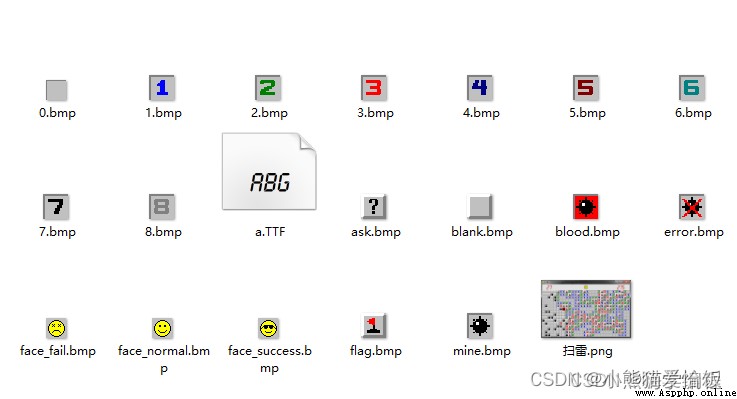
Same , Save separately py file ,mineblock.py
python Answering question consulting Learning exchange group 2:660193417###
import random
from enum import Enum
BLOCK_WIDTH = 30
BLOCK_HEIGHT = 16
SIZE = 20 # Block size
MINE_COUNT = 99 # Number of Mines
class BlockStatus(Enum):
normal = 1 # Did not click
opened = 2 # Clicked
mine = 3 # mine
flag = 4 # Marked as a mine
ask = 5 # Mark as question mark
bomb = 6 # Step on a mine
hint = 7 # Around the double-click
double = 8 # Is being double-click by the left and right mouse button
class Mine:
def __init__(self, x, y, value=0):
self._x = x
self._y = y
self._value = 0
self._around_mine_count = -1
self._status = BlockStatus.normal
self.set_value(value)
def __repr__(self):
return str(self._value)
# return f'({self._x},{self._y})={self._value}, status={self.status}'
def get_x(self):
return self._x
def set_x(self, x):
self._x = x
x = property(fget=get_x, fset=set_x)
def get_y(self):
return self._y
def set_y(self, y):
self._y = y
y = property(fget=get_y, fset=set_y)
def get_value(self):
return self._value
def set_value(self, value):
if value:
self._value = 1
else:
self._value = 0
value = property(fget=get_value, fset=set_value, doc='0: Non mine 1: Thunder ')
def get_around_mine_count(self):
return self._around_mine_count
def set_around_mine_count(self, around_mine_count):
self._around_mine_count = around_mine_count
around_mine_count = property(fget=get_around_mine_count, fset=set_around_mine_count, doc=' The number of mines around ')
def get_status(self):
return self._status
def set_status(self, value):
self._status = value
status = property(fget=get_status, fset=set_status, doc='BlockStatus')
python Answering question consulting Learning exchange group 2:660193417###
class MineBlock:
def __init__(self):
self._block = [[Mine(i, j) for i in range(BLOCK_WIDTH)] for j in range(BLOCK_HEIGHT)]
# Buried mine
for i in random.sample(range(BLOCK_WIDTH * BLOCK_HEIGHT), MINE_COUNT):
self._block[i // BLOCK_WIDTH][i % BLOCK_WIDTH].value = 1
def get_block(self):
return self._block
block = property(fget=get_block)
def getmine(self, x, y):
return self._block[y][x]
def open_mine(self, x, y):
# Step on the thunder
if self._block[y][x].value:
self._block[y][x].status = BlockStatus.bomb
return False
# First change the status to opened
self._block[y][x].status = BlockStatus.opened
around = _get_around(x, y)
_sum = 0
for i, j in around:
if self._block[j][i].value:
_sum += 1
self._block[y][x].around_mine_count = _sum
# If there's no ray around , So it will be around 8 The recursion that is not in the middle is not opened
# This can achieve a little bit of a large open effect
if _sum == 0:
for i, j in around:
if self._block[j][i].around_mine_count == -1:
self.open_mine(i, j)
return True
def double_mouse_button_down(self, x, y):
if self._block[y][x].around_mine_count == 0:
return True
self._block[y][x].status = BlockStatus.double
around = _get_around(x, y)
sumflag = 0 # The number of Mines marked around
for i, j in _get_around(x, y):
if self._block[j][i].status == BlockStatus.flag:
sumflag += 1
# The surrounding mines are all marked
result = True
if sumflag == self._block[y][x].around_mine_count:
for i, j in around:
if self._block[j][i].status == BlockStatus.normal:
if not self.open_mine(i, j):
result = False
else:
for i, j in around:
if self._block[j][i].status == BlockStatus.normal:
self._block[j][i].status = BlockStatus.hint
return result
def double_mouse_button_up(self, x, y):
self._block[y][x].status = BlockStatus.opened
for i, j in _get_around(x, y):
if self._block[j][i].status == BlockStatus.hint:
self._block[j][i].status = BlockStatus.normal
def _get_around(x, y):
""" return (x, y) The coordinates of the surrounding points """
# Note here ,range At the end is the open interval , So add 1
return [(i, j) for i in range(max(0, x - 1), min(BLOCK_WIDTH - 1, x + 1) + 1)
for j in range(max(0, y - 1), min(BLOCK_HEIGHT - 1, y + 1) + 1) if i != x or j != y]
Main code
python Answering question consulting Learning exchange group 2:660193417###
import sys
import time
from enum import Enum
import pygame
from pygame.locals import *
from mineblock import *
# The width of the game screen
SCREEN_WIDTH = BLOCK_WIDTH * SIZE
# The height of the game screen
SCREEN_HEIGHT = (BLOCK_HEIGHT + 2) * SIZE
class GameStatus(Enum):
readied = 1,
started = 2,
over = 3,
win = 4
def print_text(screen, font, x, y, text, fcolor=(255, 255, 255)):
imgText = font.render(text, True, fcolor)
screen.blit(imgText, (x, y))
python Answering question consulting Learning exchange group 2:660193417###
def main():
pygame.init()
screen = pygame.display.set_mode((SCREEN_WIDTH, SCREEN_HEIGHT))
pygame.display.set_caption(' Mine clearance ')
font1 = pygame.font.Font('resources/a.TTF', SIZE * 2) # The font of the score
fwidth, fheight = font1.size('999')
red = (200, 40, 40)
# Load resource image , Because resource files vary in size , So we did a unified scaling process
img0 = pygame.image.load('resources/0.bmp').convert()
img0 = pygame.transform.smoothscale(img0, (SIZE, SIZE))
img1 = pygame.image.load('resources/1.bmp').convert()
img1 = pygame.transform.smoothscale(img1, (SIZE, SIZE))
img2 = pygame.image.load('resources/2.bmp').convert()
img2 = pygame.transform.smoothscale(img2, (SIZE, SIZE))
img3 = pygame.image.load('resources/3.bmp').convert()
img3 = pygame.transform.smoothscale(img3, (SIZE, SIZE))
img4 = pygame.image.load('resources/4.bmp').convert()
img4 = pygame.transform.smoothscale(img4, (SIZE, SIZE))
img5 = pygame.image.load('resources/5.bmp').convert()
img5 = pygame.transform.smoothscale(img5, (SIZE, SIZE))
img6 = pygame.image.load('resources/6.bmp').convert()
img6 = pygame.transform.smoothscale(img6, (SIZE, SIZE))
img7 = pygame.image.load('resources/7.bmp').convert()
img7 = pygame.transform.smoothscale(img7, (SIZE, SIZE))
img8 = pygame.image.load('resources/8.bmp').convert()
img8 = pygame.transform.smoothscale(img8, (SIZE, SIZE))
img_blank = pygame.image.load('resources/blank.bmp').convert()
img_blank = pygame.transform.smoothscale(img_blank, (SIZE, SIZE))
img_flag = pygame.image.load('resources/flag.bmp').convert()
img_flag = pygame.transform.smoothscale(img_flag, (SIZE, SIZE))
img_ask = pygame.image.load('resources/ask.bmp').convert()
img_ask = pygame.transform.smoothscale(img_ask, (SIZE, SIZE))
img_mine = pygame.image.load('resources/mine.bmp').convert()
img_mine = pygame.transform.smoothscale(img_mine, (SIZE, SIZE))
img_blood = pygame.image.load('resources/blood.bmp').convert()
img_blood = pygame.transform.smoothscale(img_blood, (SIZE, SIZE))
img_error = pygame.image.load('resources/error.bmp').convert()
img_error = pygame.transform.smoothscale(img_error, (SIZE, SIZE))
face_size = int(SIZE * 1.25)
img_face_fail = pygame.image.load('resources/face_fail.bmp').convert()
img_face_fail = pygame.transform.smoothscale(img_face_fail, (face_size, face_size))
img_face_normal = pygame.image.load('resources/face_normal.bmp').convert()
img_face_normal = pygame.transform.smoothscale(img_face_normal, (face_size, face_size))
img_face_success = pygame.image.load('resources/face_success.bmp').convert()
img_face_success = pygame.transform.smoothscale(img_face_success, (face_size, face_size))
face_pos_x = (SCREEN_WIDTH - face_size) // 2
face_pos_y = (SIZE * 2 - face_size) // 2
img_dict = {
0: img0,
1: img1,
2: img2,
3: img3,
4: img4,
5: img5,
6: img6,
7: img7,
8: img8
}
bgcolor = (225, 225, 225) # Background color
block = MineBlock()
game_status = GameStatus.readied
start_time = None # Starting time
elapsed_time = 0 # Time consuming
while True:
# Fill background color
screen.fill(bgcolor)
for event in pygame.event.get():
if event.type == QUIT:
sys.exit()
elif event.type == MOUSEBUTTONDOWN:
mouse_x, mouse_y = event.pos
x = mouse_x // SIZE
y = mouse_y // SIZE - 2
b1, b2, b3 = pygame.mouse.get_pressed()
if game_status == GameStatus.started:
# Press the left and right mouse buttons at the same time , If all thunder has been marked , Then open a circle around
# If you haven't marked all the mines yet , There is an effect of pressing all around at the same time
if b1 and b3:
mine = block.getmine(x, y)
if mine.status == BlockStatus.opened:
if not block.double_mouse_button_down(x, y):
game_status = GameStatus.over
elif event.type == MOUSEBUTTONUP:
if y < 0:
if face_pos_x <= mouse_x <= face_pos_x + face_size \
and face_pos_y <= mouse_y <= face_pos_y + face_size:
game_status = GameStatus.readied
block = MineBlock()
start_time = time.time()
elapsed_time = 0
continue
if game_status == GameStatus.readied:
game_status = GameStatus.started
start_time = time.time()
elapsed_time = 0
if game_status == GameStatus.started:
mine = block.getmine(x, y)
if b1 and not b3: # Press the left mouse button
if mine.status == BlockStatus.normal:
if not block.open_mine(x, y):
game_status = GameStatus.over
elif not b1 and b3: # Press the right mouse button
if mine.status == BlockStatus.normal:
mine.status = BlockStatus.flag
elif mine.status == BlockStatus.flag:
mine.status = BlockStatus.ask
elif mine.status == BlockStatus.ask:
mine.status = BlockStatus.normal
elif b1 and b3:
if mine.status == BlockStatus.double:
block.double_mouse_button_up(x, y)
flag_count = 0
opened_count = 0
for row in block.block:
for mine in row:
pos = (mine.x * SIZE, (mine.y + 2) * SIZE)
if mine.status == BlockStatus.opened:
screen.blit(img_dict[mine.around_mine_count], pos)
opened_count += 1
elif mine.status == BlockStatus.double:
screen.blit(img_dict[mine.around_mine_count], pos)
elif mine.status == BlockStatus.bomb:
screen.blit(img_blood, pos)
elif mine.status == BlockStatus.flag:
screen.blit(img_flag, pos)
flag_count += 1
elif mine.status == BlockStatus.ask:
screen.blit(img_ask, pos)
elif mine.status == BlockStatus.hint:
screen.blit(img0, pos)
elif game_status == GameStatus.over and mine.value:
screen.blit(img_mine, pos)
elif mine.value == 0 and mine.status == BlockStatus.flag:
screen.blit(img_error, pos)
elif mine.status == BlockStatus.normal:
screen.blit(img_blank, pos)
print_text(screen, font1, 30, (SIZE * 2 - fheight) // 2 - 2, '%02d' % (MINE_COUNT - flag_count), red)
if game_status == GameStatus.started:
elapsed_time = int(time.time() - start_time)
print_text(screen, font1, SCREEN_WIDTH - fwidth - 30, (SIZE * 2 - fheight) // 2 - 2, '%03d' % elapsed_time, red)
if flag_count + opened_count == BLOCK_WIDTH * BLOCK_HEIGHT:
game_status = GameStatus.win
if game_status == GameStatus.over:
screen.blit(img_face_fail, (face_pos_x, face_pos_y))
elif game_status == GameStatus.win:
screen.blit(img_face_success, (face_pos_x, face_pos_y))
else:
screen.blit(img_face_normal, (face_pos_x, face_pos_y))
pygame.display.update()
if __name__ == '__main__':
main()
3、 gobang
Gobang doesn't have so many 7788 materials and other codes
python Answering question consulting Learning exchange group 2:660193417###
import sys
import random
import pygame
from pygame.locals import *
import pygame.gfxdraw
from collections import namedtuple
Chessman = namedtuple('Chessman', 'Name Value Color')
Point = namedtuple('Point', 'X Y')
BLACK_CHESSMAN = Chessman(' The spots ', 1, (45, 45, 45))
WHITE_CHESSMAN = Chessman(' An albino ', 2, (219, 219, 219))
offset = [(1, 0), (0, 1), (1, 1), (1, -1)]
class Checkerboard:
def __init__(self, line_points):
self._line_points = line_points
self._checkerboard = [[0] * line_points for _ in range(line_points)]
def _get_checkerboard(self):
return self._checkerboard
checkerboard = property(_get_checkerboard)
# Judge whether can drop son
def can_drop(self, point):
return self._checkerboard[point.Y][point.X] == 0
def drop(self, chessman, point):
"""
Move later
:param chessman:
:param point: Move later position
:return: If the son falls, he wins , Return to the winning side , Otherwise return to None
"""
print(f'{chessman.Name} ({point.X}, {point.Y})')
self._checkerboard[point.Y][point.X] = chessman.Value
if self._win(point):
print(f'{chessman.Name} win victory ')
return chessman
# Judge if you won
def _win(self, point):
cur_value = self._checkerboard[point.Y][point.X]
for os in offset:
if self._get_count_on_direction(point, cur_value, os[0], os[1]):
return True
def _get_count_on_direction(self, point, value, x_offset, y_offset):
count = 1
for step in range(1, 5):
x = point.X + step * x_offset
y = point.Y + step * y_offset
if 0 <= x < self._line_points and 0 <= y < self._line_points and self._checkerboard[y][x] == value:
count += 1
else:
break
for step in range(1, 5):
x = point.X - step * x_offset
y = point.Y - step * y_offset
if 0 <= x < self._line_points and 0 <= y < self._line_points and self._checkerboard[y][x] == value:
count += 1
else:
break
return count >= 5
python Answering question consulting Learning exchange group 2:660193417###
SIZE = 30 # The time interval between each point on the chessboard
Line_Points = 19 # Each line of the chessboard / Points per column
Outer_Width = 20 # The width outside the chessboard
Border_Width = 4 # Border width
Inside_Width = 4 # The space between the border and the actual chessboard
Border_Length = SIZE * (Line_Points - 1) + Inside_Width * 2 + Border_Width # The length of the border line
Start_X = Start_Y = Outer_Width + int(Border_Width / 2) + Inside_Width # Grid line start point ( top left corner ) coordinate
SCREEN_HEIGHT = SIZE * (Line_Points - 1) + Outer_Width * 2 + Border_Width + Inside_Width * 2 # The height of the game screen
SCREEN_WIDTH = SCREEN_HEIGHT + 200 # The width of the game screen
Stone_Radius = SIZE // 2 - 3 # The radius of the piece
Stone_Radius2 = SIZE // 2 + 3
Checkerboard_Color = (0xE3, 0x92, 0x65) # Chessboard color
BLACK_COLOR = (0, 0, 0)
WHITE_COLOR = (255, 255, 255)
RED_COLOR = (200, 30, 30)
BLUE_COLOR = (30, 30, 200)
RIGHT_INFO_POS_X = SCREEN_HEIGHT + Stone_Radius2 * 2 + 10
def print_text(screen, font, x, y, text, fcolor=(255, 255, 255)):
imgText = font.render(text, True, fcolor)
screen.blit(imgText, (x, y))
def main():
pygame.init()
screen = pygame.display.set_mode((SCREEN_WIDTH, SCREEN_HEIGHT))
pygame.display.set_caption(' gobang ')
font1 = pygame.font.SysFont('SimHei', 32)
font2 = pygame.font.SysFont('SimHei', 72)
fwidth, fheight = font2.size(' Black wins ')
checkerboard = Checkerboard(Line_Points)
cur_runner = BLACK_CHESSMAN
winner = None
computer = AI(Line_Points, WHITE_CHESSMAN)
black_win_count = 0
white_win_count = 0
while True:
for event in pygame.event.get():
if event.type == QUIT:
sys.exit()
elif event.type == KEYDOWN:
if event.key == K_RETURN:
if winner is not None:
winner = None
cur_runner = BLACK_CHESSMAN
checkerboard = Checkerboard(Line_Points)
computer = AI(Line_Points, WHITE_CHESSMAN)
elif event.type == MOUSEBUTTONDOWN:
if winner is None:
pressed_array = pygame.mouse.get_pressed()
if pressed_array[0]:
mouse_pos = pygame.mouse.get_pos()
click_point = _get_clickpoint(mouse_pos)
if click_point is not None:
if checkerboard.can_drop(click_point):
winner = checkerboard.drop(cur_runner, click_point)
if winner is None:
cur_runner = _get_next(cur_runner)
computer.get_opponent_drop(click_point)
AI_point = computer.AI_drop()
winner = checkerboard.drop(cur_runner, AI_point)
if winner is not None:
white_win_count += 1
cur_runner = _get_next(cur_runner)
else:
black_win_count += 1
else:
print(' Beyond the chessboard area ')
# Drawing board
_draw_checkerboard(screen)
# Draw the existing pieces on the chessboard
for i, row in enumerate(checkerboard.checkerboard):
for j, cell in enumerate(row):
if cell == BLACK_CHESSMAN.Value:
_draw_chessman(screen, Point(j, i), BLACK_CHESSMAN.Color)
elif cell == WHITE_CHESSMAN.Value:
_draw_chessman(screen, Point(j, i), WHITE_CHESSMAN.Color)
_draw_left_info(screen, font1, cur_runner, black_win_count, white_win_count)
if winner:
print_text(screen, font2, (SCREEN_WIDTH - fwidth)//2, (SCREEN_HEIGHT - fheight)//2, winner.Name + ' win victory ', RED_COLOR)
pygame.display.flip()
def _get_next(cur_runner):
if cur_runner == BLACK_CHESSMAN:
return WHITE_CHESSMAN
else:
return BLACK_CHESSMAN
# Drawing board
def _draw_checkerboard(screen):
# Fill the checkerboard background color
screen.fill(Checkerboard_Color)
# Draw a border outside the checkerboard grid line
pygame.draw.rect(screen, BLACK_COLOR, (Outer_Width, Outer_Width, Border_Length, Border_Length), Border_Width)
# Painted grid lines
for i in range(Line_Points):
pygame.draw.line(screen, BLACK_COLOR,
(Start_Y, Start_Y + SIZE * i),
(Start_Y + SIZE * (Line_Points - 1), Start_Y + SIZE * i),
1)
for j in range(Line_Points):
pygame.draw.line(screen, BLACK_COLOR,
(Start_X + SIZE * j, Start_X),
(Start_X + SIZE * j, Start_X + SIZE * (Line_Points - 1)),
1)
# Draw the star position and Tianyuan
for i in (3, 9, 15):
for j in (3, 9, 15):
if i == j == 9:
radius = 5
else:
radius = 3
# pygame.draw.circle(screen, BLACK, (Start_X + SIZE * i, Start_Y + SIZE * j), radius)
pygame.gfxdraw.aacircle(screen, Start_X + SIZE * i, Start_Y + SIZE * j, radius, BLACK_COLOR)
pygame.gfxdraw.filled_circle(screen, Start_X + SIZE * i, Start_Y + SIZE * j, radius, BLACK_COLOR)
# Painting pieces
def _draw_chessman(screen, point, stone_color):
# pygame.draw.circle(screen, stone_color, (Start_X + SIZE * point.X, Start_Y + SIZE * point.Y), Stone_Radius)
pygame.gfxdraw.aacircle(screen, Start_X + SIZE * point.X, Start_Y + SIZE * point.Y, Stone_Radius, stone_color)
pygame.gfxdraw.filled_circle(screen, Start_X + SIZE * point.X, Start_Y + SIZE * point.Y, Stone_Radius, stone_color)
python Answering question consulting Learning exchange group 2:660193417###
# Draw the left information display
def _draw_left_info(screen, font, cur_runner, black_win_count, white_win_count):
_draw_chessman_pos(screen, (SCREEN_HEIGHT + Stone_Radius2, Start_X + Stone_Radius2), BLACK_CHESSMAN.Color)
_draw_chessman_pos(screen, (SCREEN_HEIGHT + Stone_Radius2, Start_X + Stone_Radius2 * 4), WHITE_CHESSMAN.Color)
print_text(screen, font, RIGHT_INFO_POS_X, Start_X + 3, ' The player ', BLUE_COLOR)
print_text(screen, font, RIGHT_INFO_POS_X, Start_X + Stone_Radius2 * 3 + 3, ' The computer ', BLUE_COLOR)
print_text(screen, font, SCREEN_HEIGHT, SCREEN_HEIGHT - Stone_Radius2 * 8, ' The war situation :', BLUE_COLOR)
_draw_chessman_pos(screen, (SCREEN_HEIGHT + Stone_Radius2, SCREEN_HEIGHT - int(Stone_Radius2 * 4.5)), BLACK_CHESSMAN.Color)
_draw_chessman_pos(screen, (SCREEN_HEIGHT + Stone_Radius2, SCREEN_HEIGHT - Stone_Radius2 * 2), WHITE_CHESSMAN.Color)
print_text(screen, font, RIGHT_INFO_POS_X, SCREEN_HEIGHT - int(Stone_Radius2 * 5.5) + 3, f'{black_win_count} - ', BLUE_COLOR)
print_text(screen, font, RIGHT_INFO_POS_X, SCREEN_HEIGHT - Stone_Radius2 * 3 + 3, f'{white_win_count} - ', BLUE_COLOR)
def _draw_chessman_pos(screen, pos, stone_color):
pygame.gfxdraw.aacircle(screen, pos[0], pos[1], Stone_Radius2, stone_color)
pygame.gfxdraw.filled_circle(screen, pos[0], pos[1], Stone_Radius2, stone_color)
# According to the mouse click position , Return to the game area coordinates
def _get_clickpoint(click_pos):
pos_x = click_pos[0] - Start_X
pos_y = click_pos[1] - Start_Y
if pos_x < -Inside_Width or pos_y < -Inside_Width:
return None
x = pos_x // SIZE
y = pos_y // SIZE
if pos_x % SIZE > Stone_Radius:
x += 1
if pos_y % SIZE > Stone_Radius:
y += 1
if x >= Line_Points or y >= Line_Points:
return None
return Point(x, y)
class AI:
def __init__(self, line_points, chessman):
self._line_points = line_points
self._my = chessman
self._opponent = BLACK_CHESSMAN if chessman == WHITE_CHESSMAN else WHITE_CHESSMAN
self._checkerboard = [[0] * line_points for _ in range(line_points)]
def get_opponent_drop(self, point):
self._checkerboard[point.Y][point.X] = self._opponent.Value
def AI_drop(self):
point = None
score = 0
for i in range(self._line_points):
for j in range(self._line_points):
if self._checkerboard[j][i] == 0:
_score = self._get_point_score(Point(i, j))
if _score > score:
score = _score
point = Point(i, j)
elif _score == score and _score > 0:
r = random.randint(0, 100)
if r % 2 == 0:
point = Point(i, j)
self._checkerboard[point.Y][point.X] = self._my.Value
return point
def _get_point_score(self, point):
score = 0
for os in offset:
score += self._get_direction_score(point, os[0], os[1])
return score
def _get_direction_score(self, point, x_offset, y_offset):
count = 0 # The number of our continuous subsets at the drop
_count = 0 # The number of consecutive sons of the other party at the drop
space = None # Whether there are spaces in our continuous subsets
_space = None # Whether there is a space in the other party's continuum
both = 0 # Whether the two ends of our continuum are blocked
_both = 0 # Whether the two ends of the opponent's continuum are blocked
# If it is 1 It means our prescription is on the side ,2 It means the enemy's prescription
flag = self._get_stone_color(point, x_offset, y_offset, True)
if flag != 0:
for step in range(1, 6):
x = point.X + step * x_offset
y = point.Y + step * y_offset
if 0 <= x < self._line_points and 0 <= y < self._line_points:
if flag == 1:
if self._checkerboard[y][x] == self._my.Value:
count += 1
if space is False:
space = True
elif self._checkerboard[y][x] == self._opponent.Value:
_both += 1
break
else:
if space is None:
space = False
else:
break # Exit with the second space
elif flag == 2:
if self._checkerboard[y][x] == self._my.Value:
_both += 1
break
elif self._checkerboard[y][x] == self._opponent.Value:
_count += 1
if _space is False:
_space = True
else:
if _space is None:
_space = False
else:
break
else:
# Meeting an edge is blocking
if flag == 1:
both += 1
elif flag == 2:
_both += 1
if space is False:
space = None
if _space is False:
_space = None
_flag = self._get_stone_color(point, -x_offset, -y_offset, True)
if _flag != 0:
for step in range(1, 6):
x = point.X - step * x_offset
y = point.Y - step * y_offset
if 0 <= x < self._line_points and 0 <= y < self._line_points:
if _flag == 1:
if self._checkerboard[y][x] == self._my.Value:
count += 1
if space is False:
space = True
elif self._checkerboard[y][x] == self._opponent.Value:
_both += 1
break
else:
if space is None:
space = False
else:
break # Exit with the second space
elif _flag == 2:
if self._checkerboard[y][x] == self._my.Value:
_both += 1
break
elif self._checkerboard[y][x] == self._opponent.Value:
_count += 1
if _space is False:
_space = True
else:
if _space is None:
_space = False
else:
break
else:
# Meeting an edge is blocking
if _flag == 1:
both += 1
elif _flag == 2:
_both += 1
score = 0
if count == 4:
score = 10000
elif _count == 4:
score = 9000
elif count == 3:
if both == 0:
score = 1000
elif both == 1:
score = 100
else:
score = 0
elif _count == 3:
if _both == 0:
score = 900
elif _both == 1:
score = 90
else:
score = 0
elif count == 2:
if both == 0:
score = 100
elif both == 1:
score = 10
else:
score = 0
elif _count == 2:
if _both == 0:
score = 90
elif _both == 1:
score = 9
else:
score = 0
elif count == 1:
score = 10
elif _count == 1:
score = 9
else:
score = 0
if space or _space:
score /= 2
return score
# It is our side to judge that the designated position is in the designated direction 、 Right prescription 、 empty
def _get_stone_color(self, point, x_offset, y_offset, next):
x = point.X + x_offset
y = point.Y + y_offset
if 0 <= x < self._line_points and 0 <= y < self._line_points:
if self._checkerboard[y][x] == self._my.Value:
return 1
elif self._checkerboard[y][x] == self._opponent.Value:
return 2
else:
if next:
return self._get_stone_color(Point(x, y), x_offset, y_offset, False)
else:
return 0
else:
return 0
if __name__ == '__main__':
main()
4、 snake
python Answering question consulting Learning exchange group 2:660193417###
import random
import sys
import time
import pygame
from pygame.locals import *
from collections import deque
SCREEN_WIDTH = 600 # Screen width
SCREEN_HEIGHT = 480 # Screen height
SIZE = 20 # Small square size
LINE_WIDTH = 1 # Grid line width
# The coordinate range of the game area
SCOPE_X = (0, SCREEN_WIDTH // SIZE - 1)
SCOPE_Y = (2, SCREEN_HEIGHT // SIZE - 1)
# Score and color of food
FOOD_STYLE_LIST = [(10, (255, 100, 100)), (20, (100, 255, 100)), (30, (100, 100, 255))]
LIGHT = (100, 100, 100)
DARK = (200, 200, 200) # The color of the snake
BLACK = (0, 0, 0) # Grid line color
RED = (200, 30, 30) # Red ,GAME OVER Font color for
BGCOLOR = (40, 40, 60) # Background color
def print_text(screen, font, x, y, text, fcolor=(255, 255, 255)):
imgText = font.render(text, True, fcolor)
screen.blit(imgText, (x, y))
# Initialize snake
def init_snake():
snake = deque()
snake.append((2, SCOPE_Y[0]))
snake.append((1, SCOPE_Y[0]))
snake.append((0, SCOPE_Y[0]))
return snake
def create_food(snake):
food_x = random.randint(SCOPE_X[0], SCOPE_X[1])
food_y = random.randint(SCOPE_Y[0], SCOPE_Y[1])
while (food_x, food_y) in snake:
# If food comes to snakes , So let's start over
food_x = random.randint(SCOPE_X[0], SCOPE_X[1])
food_y = random.randint(SCOPE_Y[0], SCOPE_Y[1])
return food_x, food_y
def get_food_style():
return FOOD_STYLE_LIST[random.randint(0, 2)]
python Answering question consulting Learning exchange group 2:660193417###
def main():
pygame.init()
screen = pygame.display.set_mode((SCREEN_WIDTH, SCREEN_HEIGHT))
pygame.display.set_caption(' snake ')
font1 = pygame.font.SysFont('SimHei', 24) # The font of the score
font2 = pygame.font.Font(None, 72) # GAME OVER The font of
fwidth, fheight = font2.size('GAME OVER')
# If the snake is moving to the right , Then quickly click down and left , Because the program refresh is not so fast , The down event will be overwritten to the left , Cause the snake to retreat , direct GAME OVER
# b Variables are used to prevent this from happening
b = True
# The snake
snake = init_snake()
# food
food = create_food(snake)
food_style = get_food_style()
# Direction
pos = (1, 0)
game_over = True
start = False # Do you want to start , When start = True,game_over = True when , Only show GAME OVER
score = 0 # score
orispeed = 0.5 # Raw speed
speed = orispeed
last_move_time = None
pause = False # Pause
while True:
for event in pygame.event.get():
if event.type == QUIT:
sys.exit()
elif event.type == KEYDOWN:
if event.key == K_RETURN:
if game_over:
start = True
game_over = False
b = True
snake = init_snake()
food = create_food(snake)
food_style = get_food_style()
pos = (1, 0)
# score
score = 0
last_move_time = time.time()
elif event.key == K_SPACE:
if not game_over:
pause = not pause
elif event.key in (K_w, K_UP):
# This judgment is to prevent the snake from pressing the down button when it moves up , Lead to direct GAME OVER
if b and not pos[1]:
pos = (0, -1)
b = False
elif event.key in (K_s, K_DOWN):
if b and not pos[1]:
pos = (0, 1)
b = False
elif event.key in (K_a, K_LEFT):
if b and not pos[0]:
pos = (-1, 0)
b = False
elif event.key in (K_d, K_RIGHT):
if b and not pos[0]:
pos = (1, 0)
b = False
# Fill background color
screen.fill(BGCOLOR)
# Painted grid lines A vertical bar
for x in range(SIZE, SCREEN_WIDTH, SIZE):
pygame.draw.line(screen, BLACK, (x, SCOPE_Y[0] * SIZE), (x, SCREEN_HEIGHT), LINE_WIDTH)
# Painted grid lines Horizontal line
for y in range(SCOPE_Y[0] * SIZE, SCREEN_HEIGHT, SIZE):
pygame.draw.line(screen, BLACK, (0, y), (SCREEN_WIDTH, y), LINE_WIDTH)
if not game_over:
curTime = time.time()
if curTime - last_move_time > speed:
if not pause:
b = True
last_move_time = curTime
next_s = (snake[0][0] + pos[0], snake[0][1] + pos[1])
if next_s == food:
# Eat the food
snake.appendleft(next_s)
score += food_style[0]
speed = orispeed - 0.03 * (score // 100)
food = create_food(snake)
food_style = get_food_style()
else:
if SCOPE_X[0] <= next_s[0] <= SCOPE_X[1] and SCOPE_Y[0] <= next_s[1] <= SCOPE_Y[1] \
and next_s not in snake:
snake.appendleft(next_s)
snake.pop()
else:
game_over = True
# Painting food
if not game_over:
# avoid GAME OVER When the time is right GAME OVER The words are covered up
pygame.draw.rect(screen, food_style[1], (food[0] * SIZE, food[1] * SIZE, SIZE, SIZE), 0)
# Draw a snake
for s in snake:
pygame.draw.rect(screen, DARK, (s[0] * SIZE + LINE_WIDTH, s[1] * SIZE + LINE_WIDTH,
SIZE - LINE_WIDTH * 2, SIZE - LINE_WIDTH * 2), 0)
print_text(screen, font1, 30, 7, f' Speed : {score//100}')
print_text(screen, font1, 450, 7, f' score : {score}')
if game_over:
if start:
print_text(screen, font2, (SCREEN_WIDTH - fwidth) // 2, (SCREEN_HEIGHT - fheight) // 2, 'GAME OVER', RED)
pygame.display.update()
if __name__ == '__main__':
main()
 The parameter of ABS function in Python is the return value of complex number
This abs The function returns
 Ubuntu installation of python3.7 and the solution to the failure of soft link switching between python3 and PIP3
The terminal input has been so