最近看到同事小紅在做一維碼,感覺挺好玩,於是就在網上找了一個例子來玩玩。
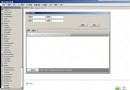
下面的代碼均為網上的代碼,做了一些整理,但是忘記了出處,原作者看到可以提醒我,謝謝。 首先,一維碼的相關知識可以先百度一下:http://baike.baidu.com/link?url=I4k1PM3WN5T9z0tGSC7eKLVg8GlDZvoWTM8N4cxzocueqAJBOHQl5SwB4fcpF3AWE3V8ipWqY_w7Rb0EcZA6v_ 其中講的還是比較清楚的,了解就行。 說明:本例講的是code39,其他的沒有哦。 界面如下:(不忍直視)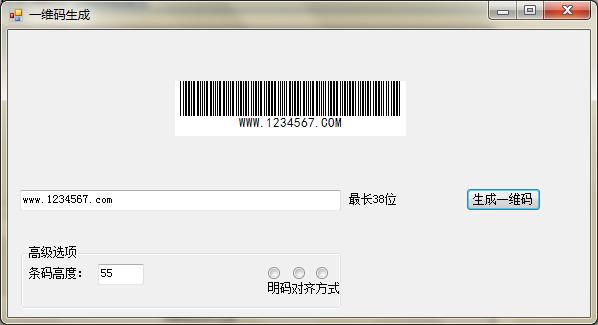
 我使用微信掃一掃可以得到如下的結果:
 應該說效果還是比較可以的。
如果需要該代碼的就到360雲盤去下吧:http://yunpan.cn/cKICBPBrk7xxh 提取碼 0fe0
但是考慮到有些只是想看看流程的同學,我將主要的代碼貼到下面了
應該說效果還是比較可以的。
如果需要該代碼的就到360雲盤去下吧:http://yunpan.cn/cKICBPBrk7xxh 提取碼 0fe0
但是考慮到有些只是想看看流程的同學,我將主要的代碼貼到下面了
        /// <summary>
        /// 生成條碼 Bitmap,自定義條碼高度,自定義文字對齊樣式
        /// </summary>
        /// <param name="sourceCode"></param>
        /// <param name="barCodeHeight"></param>
        /// <param name="sf"></param>
        /// <returns></returns>
        public   Bitmap GetCode39(string sourceCode, int barCodeHeight, StringFormat sf)
        {
            BarCodeText = sourceCode.ToUpper();
            int leftMargin = 5;
            int topMargin = 0;
            int thickLength = 2;
            int narrowLength = 1;
            int intSourceLength = sourceCode.Length;
            string strEncode = "010010100" ; //添加起始碼“ *”.
            var font = new System.Drawing.Font( "Segoe UI", 5);
            string AlphaBet = "0123456789ABCDEFGHIJKLMNOPQRSTUVWXYZ-. $/+%*" ;
            string[] Code39 =
             {
                 /* 0 */ "000110100" ,
                 /* 1 */ "100100001" ,
                 /* 2 */ "001100001" ,
                 /* 3 */ "101100000" ,
                 /* 4 */ "000110001" ,
                 /* 5 */ "100110000" ,
                 /* 6 */ "001110000" ,
                 /* 7 */ "000100101" ,
                 /* 8 */ "100100100" ,
                 /* 9 */ "001100100" ,
                 /* A */ "100001001" ,
                 /* B */ "001001001" ,
                 /* C */ "101001000" ,
                 /* D */ "000011001" ,
                 /* E */ "100011000" ,
                 /* F */ "001011000" ,
                 /* G */ "000001101" ,
                 /* H */ "100001100" ,
                 /* I */ "001001100" ,
                 /* J */ "000011100" ,
                 /* K */ "100000011" ,
                 /* L */ "001000011" ,
                 /* M */ "101000010" ,
                 /* N */ "000010011" ,
                 /* O */ "100010010" ,
                 /* P */ "001010010" ,
                 /* Q */ "000000111" ,
                 /* R */ "100000110" ,
                 /* S */ "001000110" ,
                 /* T */ "000010110" ,
                 /* U */ "110000001" ,
                 /* V */ "011000001" ,
                 /* W */ "111000000" ,
                 /* X */ "010010001" ,
                 /* Y */ "110010000" ,
                 /* Z */ "011010000" ,
                 /* - */ "010000101" ,
                 /* . */ "110000100" ,
                 /*' '*/ "011000100" ,
                 /* $ */ "010101000" ,
                 /* / */ "010100010" ,
                 /* + */ "010001010" ,
                 /* % */ "000101010" ,
                 /* * */ "010010100"
             };
            sourceCode = sourceCode.ToUpper();
            Bitmap objBitmap = new Bitmap(((thickLength * 3 + narrowLength * 7) * (intSourceLength + 2)) +
                                           (leftMargin * 2), barCodeHeight + (topMargin * 2));
            Graphics objGraphics = Graphics.FromImage(objBitmap);
            objGraphics.FillRectangle( Brushes.White, 0, 0, objBitmap.Width, objBitmap.Height);
            for (int i = 0; i < intSourceLength; i++)
            {
                //非法字符校驗
                if (AlphaBet.IndexOf(sourceCode[i]) == -1 || sourceCode[i] == '*' )
                {
                    objGraphics.DrawString( "Invalid Bar Code", SystemFonts.DefaultFont, Brushes .Red, leftMargin, topMargin);
                    return objBitmap;
                }
                //編碼
                strEncode = string.Format("{0}0{1}" , strEncode,
                Code39[AlphaBet.IndexOf(sourceCode[i])]);
            }
            strEncode = string.Format("{0}0010010100" , strEncode); //添加結束碼“*”
            int intEncodeLength = strEncode.Length;
            int intBarWidth;
            for (int i = 0; i < intEncodeLength; i++) //繪制 Code39 barcode
            {
                intBarWidth = strEncode[i] == '1' ? thickLength : narrowLength;
                objGraphics.FillRectangle(i % 2 == 0 ? Brushes.Black : Brushes .White, leftMargin, topMargin, intBarWidth, barCodeHeight);
                leftMargin += intBarWidth;
            }
            //繪制明碼
            Font barCodeTextFont = new Font( "黑體" , 10F);
            RectangleF rect = new RectangleF(2, barCodeHeight - 20, objBitmap.Width - 4, 20);
            objGraphics.FillRectangle( Brushes.White, rect);
            //文本對齊
            objGraphics.DrawString(BarCodeText, barCodeTextFont, Brushes.Black, rect, sf);
            return objBitmap;
        }
好了,如果有興趣的同學就可以去看看怎麼實現自己的想要的一維碼了。
說明:本人才疏學淺,文中必定有沒有想到的地方,還請包涵。