jsp登錄頁面的簡單實例 雛形
<%@ page language="java" contentType="text/html; charset=UTF-8"
  pageEncoding="UTF-8"%>
<!DOCTYPE html PUBLIC "-//W3C//DTD HTML 4.01 Transitional//EN" "http://www.w3.org/TR/html4/loose.dtd">
<html>
<head>
<meta http-equiv="Content-Type" content="text/html; charset=UTF-8">
<title>歡迎頁面</title>
</head>
<body>
<%
session.invalidate();//銷毀session

%>

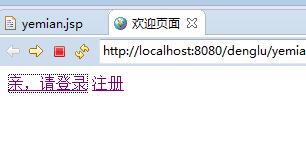
<a href="denglu.jsp" >親,請登錄</a>
<a href="zhuce.jsp">注冊</a>
</body>
</html>
歡迎界面:
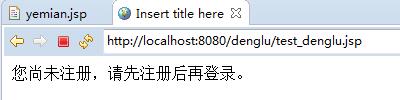
尚未注冊,直接登錄的時候:
<%@ page language="java" contentType="text/html; charset=UTF-8"
  pageEncoding="UTF-8"%>
<!DOCTYPE html PUBLIC "-//W3C//DTD HTML 4.01 Transitional//EN" "http://www.w3.org/TR/html4/loose.dtd">
<html>
<head>
<meta http-equiv="Content-Type" content="text/html; charset=UTF-8">
<title>登錄</title>
</head>
<body>
<form action="test_denglu.jsp" method="post">
<table width="300" height="300" border="0" align="center">
  <tr height="80" align="center">
    <td colspan="2"><font size="24">OO登錄</font></td></tr>
  <tr height="30">
    <td width="80" align="right">用戶名:</td>
    <td><input type="text" name="username"></td></tr>
  <tr height="30">
    <td width="80" align="right"> 密  碼:</td>
    <td> <input type="password" name="password"></td></tr>
    <tr><td height="40" align="center" colspan="2">
    <input type="submit" value="登錄">
    </td></tr>
 </table>
</form>
</body>
</html>
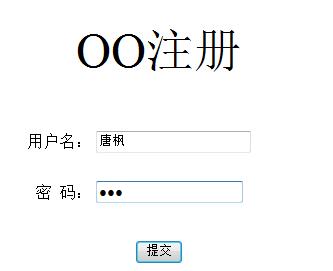
進入注冊界面:
<%@ page language="java" contentType="text/html; charset=UTF-8"
  pageEncoding="UTF-8"%>
<!DOCTYPE html PUBLIC "-//W3C//DTD HTML 4.01 Transitional//EN" "http://www.w3.org/TR/html4/loose.dtd">
<html>
<head>
<meta http-equiv="Content-Type" content="text/html; charset=UTF-8">
<title>注冊</title>
</head>
<body>
<form action="test_zhuce.jsp" method="post">
<table width="300" height="300" border="0" align="center">
  <tr height="80" align="center">
    <td colspan="2"><font size="24">OO注冊</font></td></tr>
  <tr height="30">
    <td width="80" align="right">用戶名:</td>
    <td><input type="text" name="username"></td></tr>
  <tr height="30">
    <td width="80" align="right"> 密  碼:</td>
    <td> <input type="password" name="password"></td></tr>
    <tr><td height="40" align="center" colspan="2">
    <input type="submit" value="提交">
    </td></tr>
 </table>
</form>
</body>
</html>
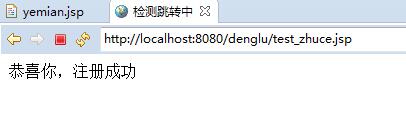
注冊成功,跳轉登錄界面:
<%@ page language="java" contentType="text/html; charset=UTF-8"
  pageEncoding="UTF-8" import="java.sql.*"%>
<!DOCTYPE html PUBLIC "-//W3C//DTD HTML 4.01 Transitional//EN" "http://www.w3.org/TR/html4/loose.dtd">
<html>
<head>
<meta http-equiv="Content-Type" content="text/html; charset=UTF-8">
<title>檢測跳轉中</title>
</head>
<body>
<%
String name = new String(request.getParameter("username").getBytes("ISO-8859-1"),"UTF-8");
String pw = request.getParameter("password");

String str = "select * from USERS WHERE username = '" + name + "'";
String str1 = "insert into users values(xuhao.nextval,'" + name + "','" + pw +"')";

try{

   //連接數據庫
   Connection conn = null;
   Class.forName("oracle.jdbc.driver.OracleDriver");
   String strURL = "jdbc:oracle:thin:@localhost:1521:SP";
   conn = DriverManager.getConnection(strURL, "test", "123");
   System.out.println("數據庫連接成功");
   Statement st = conn.createStatement();
   ResultSet rs = st.executeQuery(str);
   if(rs.next()){
     if(name.equals(rs.getString(2))){
       out.println("對不起,用戶名已使用。");
       out.println("<br>建議使用用戶名:" + name +"99");
       response.setHeader("refresh", "5;URL=zhuce.jsp");
     }
   }else{
     int a = st.executeUpdate(str1);
     if(a == 1){
       out.println("恭喜你,注冊成功");
       session.setAttribute("username", name);
       response.setHeader("refresh", "3;URL=denglu.jsp");
     }
   }

   rs.close();
   st.close();
   conn.close();
}catch(Exception e){
  e.printStackTrace();
}
%>
<br><br>

</body>
</html>
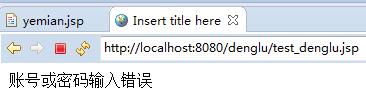
登錄時,密碼出錯:5秒後重新登錄
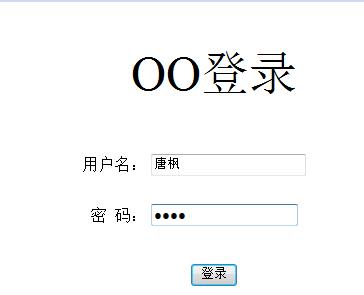
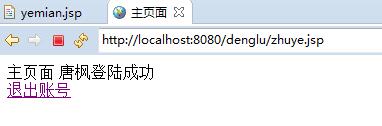
賬號密碼輸入正確,進入主頁面:
<%@ page language="java" contentType="text/html; charset=UTF-8"
  pageEncoding="UTF-8"%>
<!DOCTYPE html PUBLIC "-//W3C//DTD HTML 4.01 Transitional//EN" "http://www.w3.org/TR/html4/loose.dtd">
<html>
<head>
<meta http-equiv="Content-Type" content="text/html; charset=UTF-8">
<title>主頁面</title>
</head>
<body>
主頁面
<%
Object obj = session.getAttribute("username");
if(obj != null){
  String str = obj.toString();
  out.println(str + "登陸成功");
}else{
  out.println("登錄超時,請重新登錄");
  response.setHeader("refresh", "5;URL=denglu.jsp");
}
%>
<br>

<a href="yemian.jsp">退出賬號</a>

</body>
</html>
以上就是小編為大家帶來的jsp登錄頁面的簡單實例 雛形全部內容了,希望大家多多支持~