Use pycharm install dlib Has been an error
note: This is an issue with the package mentioned above, not pip.
hint: See above for output from the failure.
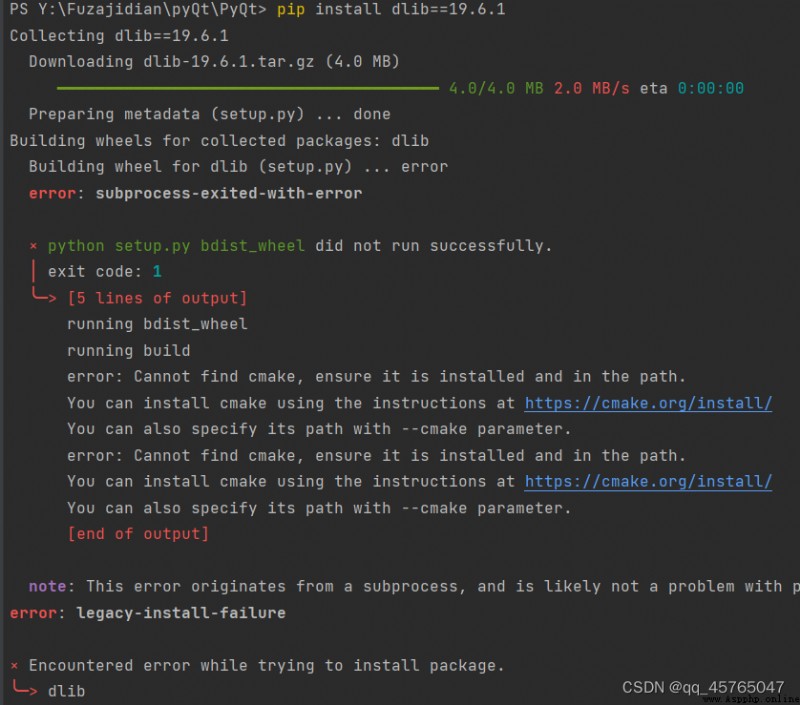
Their own python Version too high
see python edition (windows System ):
ctrl+R
cmd
python
my python Version is python3.10.5
I have checked many online solutions , What is more direct and easy to use is installation .whl file
for example :
pip install dlib-19.8.1-cp36-cp36m-win_amd64.whl
here cp36 It's corresponding to python3.6 edition , If your own python The version does not correspond to it , Generally, the installation fails .
But there are two problems , One is how to get .whl file , Another problem is to have version correspondence .
Question 1 : How to get
solve : I found a lot of information here , Just attach the link
python3.10 Corresponding version :cp310m_win_amd64.whl
https://github.com/jloh02/dlib/releases/download/v19.22/dlib-19.22.99-cp310-cp310-win_amd64.whl
Here attached python3.7-3.10 The version corresponds to .whl file :github link
Question two : The version corresponds to
solve : Use with python Install the file corresponding to the version
When I python3.10 install cp36 The following error will appear in the version :
download dlib-19.22.99-cp310-cp310-win_amd64.whl Put the file in the directory you want to install or the virtual environment package directory , I put it directly in my python Package directory in the installation path F:\Python\Lib\site-packages
Right click : Open in the terminal
Carry out orders :
pip install dlib-19.22.99-cp310-cp310-win_amd64.whl
Installation successful :
The code will not report an error :
 Process notes for upgrading Python from 3.6 to 3.8 and deploying tensorflow2 based on centos7 environment
0. Preface primary Python The
 How to use Python to modify matplotlib pyplot. Position of the colorbar to align the main image
Catalog Problem description